
How Property Management Companies Can Automate Bank Statement Reconciliation in 2026
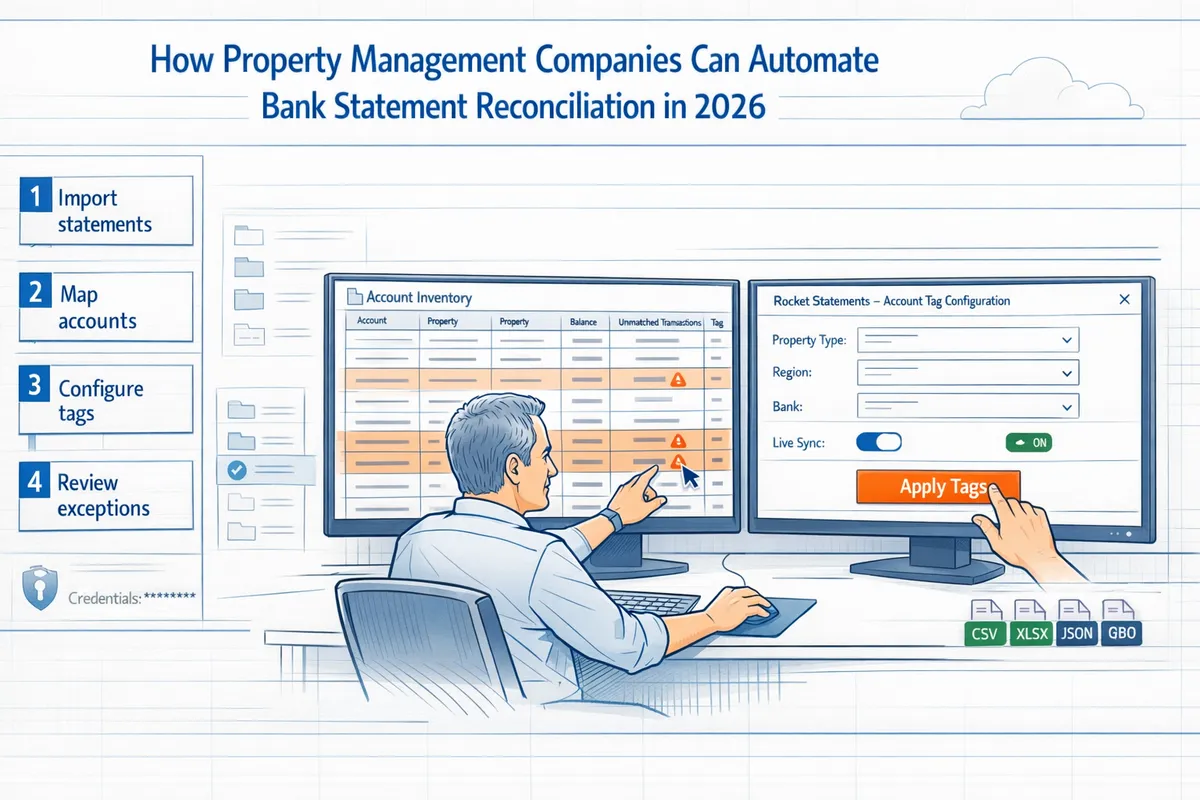
How Property Management Companies Can Automate Bank Statement Reconciliation in 2026
A single misposted payment can delay month-end closes by days for property managers juggling dozens of accounts. This step-by-step how-to guide shows how to automate bank statement reconciliation for property management companies using Rocket Statements. We'll walk through account mapping, OCR conversion to CSV and QuickBooks formats, live bank feeds, multi-entity workflows, security measures, and troubleshooting so your team reduces manual entry and closes faster. Rocket Statements converts PDF and image statements into spreadsheets, manages documents in cloud folders and subfolders, syncs live transaction data, and exports CSV, Excel, JSON, and QuickBooks-compatible files. For integration playbooks and process examples, see our property management finance automation pillar page. What mapping pitfalls do teams overlook until month-end?
Problem definition and preparation
Before you automate bank statement reconciliation for property management companies, define the scope and surface every operational hurdle that will touch the pipeline. This section forces controllers and owners to inventory accounts and entities, lock down compliance requirements, map data sources, and understand the engineering toil of a custom build. Clear scope reduces surprise work during implementation and sets measurable success criteria.
Inventory accounts and entities 🔎
Start with a complete ledger of bank accounts and legal entities tied to each portfolio. Record: account name, bank, last four digits, trust versus operating classification, legal entity (LLC/DO), monthly transaction volume, average deposit count, and whether the account obligates separate trust accounting. For example, a 250-unit portfolio might have 18 bank accounts across three entities with 2,400 monthly transactions; that profile requires per-entity CSV outputs and separate trust reconciliations.
Map each bank account to a reconciliation target (QuickBooks class, Buildium property, or entity ledger). Our website recommends using Rocket Statements to tag accounts at ingest so your automation produces per-entity CSV or QuickBooks-compatible files without manual splitting. This inventory phase prevents later rework when multi-entity workflows create duplicate or misapplied entries. See our Property Management overview for common account mappings.
Compliance, audit trail, and retention 📁
Document trust-account rules and retention per jurisdiction before automating. List required fields for auditor sign-offs (signed monthly reconciliations, CSV exports, ledger snapshots), mandated retention periods (for example, some states require seven years), and who must approve or sign reports. Specify whether auditors need exportable CSV/Excel or notarized PDFs.
Decide audit-log design now: which user actions require recording, how long logs persist, and whether logs must be immutable. Our website’s Rocket Statements converts statements into CSV, Excel, JSON, and PDF and stores documents in cloud folders, which lets you produce auditor-ready files from a single source. Link reconciliation outputs to your document retention policy and record a clear chain of custody for every reconciliation run.
Data sources and file types to support 🗂️
Catalog every input type your pipeline must handle: bank PDFs, scanned images, bank CSVs, OFX/QFX exports, and third-party feeds (Buildium, Rent Manager, other PM systems). For each source, list expected column names or OCR fields (date, description, amount, running balance, check number, payee) and examples of messy cases (split transactions, combined credits, foreign currency lines).
Create normalization rules up front. Example rule: convert negative-amount formats like "(1,234.56)" to "-1234.56"; map multiple date formats to ISO 8601; drop duplicate header rows from CSVs. Rocket Statements handles PDF and image conversion to spreadsheets and can sync live transactions from bank feeds, reducing the normalization burden. For third-party systems, plan export cadence (daily vs monthly) and whether you need incremental syncs or full-file ingestion. See our guide on how to automate monthly reconciliations for integration patterns with Buildium and accounting systems.
DIY complexity checklist: engineering challenges ⚠️
A production-ready custom pipeline requires work across security, scalability, and observability. Key tasks you must build and maintain:
- Credential storage and rotation. Store bank and API credentials securely (hardware or cloud KMS) and rotate keys on schedule. Missing rotation causes outages.
- Token refresh and quota handling. Implement OAuth refresh flows (with backoff) and monitor API quotas to avoid throttles.
- Rate-limit handling and retry logic. Add exponential backoff, idempotency keys, and retry windows for transient failures.
- Race-condition resolution and cache invalidation. Prevent duplicate writes when multiple workers process the same account file.
- Monitoring, alerting, and incident response. Track failed reconciliations, OCR error rates, and delayed feeds. Define SLAs and runbooks.
- Audit-trail design and immutable logs. Capture who ran reconciliations, which files changed, and exportable evidence for auditors.
- OCR quality management and exception workflows. Triage low-confidence extractions and route them to human review.
- Multi-entity mapping logic. Maintain mapping tables that convert bank accounts to legal entities and accounting classes.
Small illustrative auth/retry pseudo-code (not copy-paste ready):
token = get_token_from_kms
resp = api.call(data, headers={"Authorization": f"Bearer {token}"})
if resp.status == 401:
 token = refresh_token
 resp = api.call(data, headers={"Authorization": f"Bearer {token}"})
if resp.error and resp.retryable:
 backoff_and_retry(resp)
Building all of the above typically means ongoing engineering time, security reviews, and support costs. Rocket Statements removes the bulk of that maintenance by converting PDFs to spreadsheets, syncing live bank transactions, and producing QuickBooks-compatible or CSV outputs, so your team focuses on exceptions instead of plumbing.
⚠️ Warning: Storing bank credentials in plain environment variables or shared spreadsheets creates a high-risk vector for breaches and outages. Use dedicated secret management and rotate keys regularly.
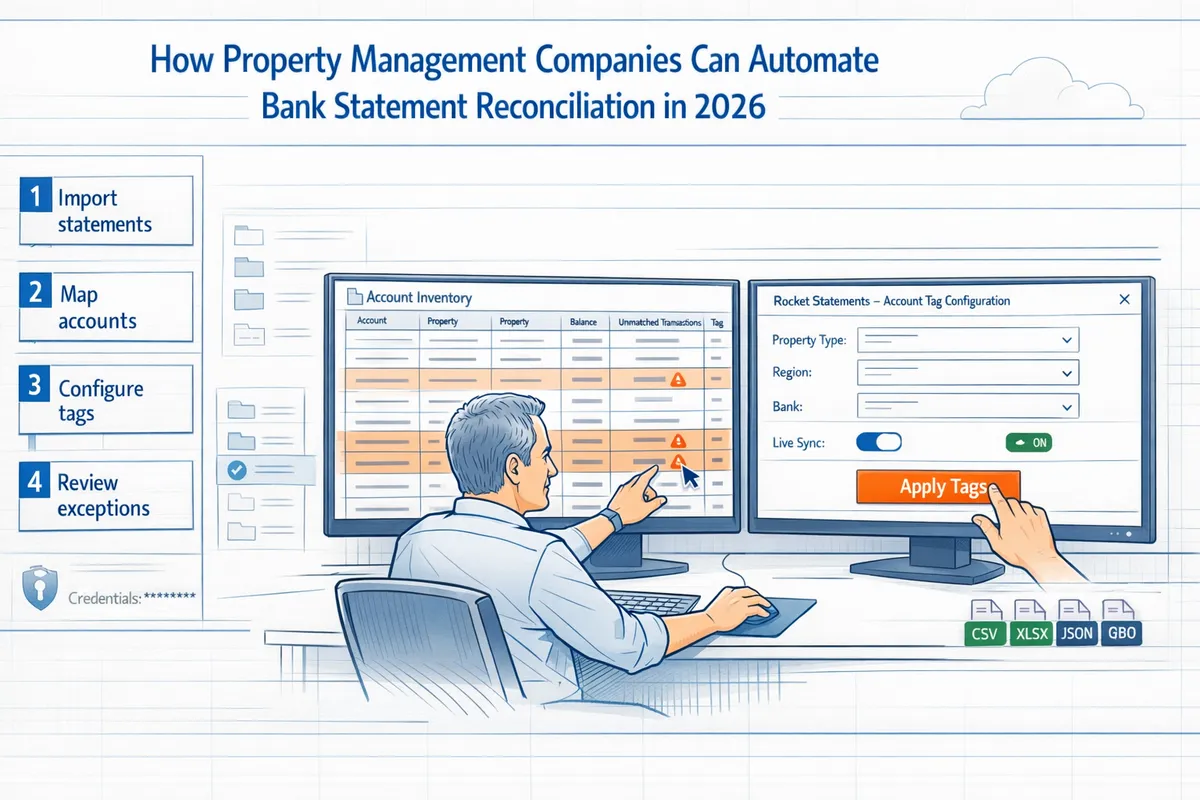
Related reading: our Property Management page explains typical account-to-property mappings, and our Accounting & Bookkeeping article discusses file formats and QuickBooks outputs for reconciliations.
Step-by-step instructions to automate reconciliation (with visuals)
Follow these numbered setup and daily-run steps to convert statements, map transactions, enable live feeds, and export QuickBooks-compatible files. Each step lists required inputs, expected outputs, and exactly where Rocket Statements removes manual work so your team spends time on exceptions, not file wrangling.
Step 1 — Centralize statements in the cloud 📥
Inputs. Raw bank PDFs, scanned deposit slips, and email/FTP attachments. Expected output. A single, searchable repository with a consistent folder structure per property and entity.
- Create folders in Rocket Statements: /Portfolio/Entity/Property/Bank/YYYY-MM. Name files using: entity_property_account_YYYYMM.pdf.
- Point automated email ingestion or FTP drops to those folders so files land automatically. Rocket Statements tags incoming files with source, timestamp, and OCR status.
- What you avoid by using Rocket Statements: building secure storage, file deduplication, and access-control lists yourself. DIY alternatives require building S3 buckets, ACLs, virus scanning, and monitoring for missed uploads.
See how this fits property workflows on our Property Management page.
Step 2 — Convert PDFs and images to CSV/Excel/JSON 🔁
Inputs. Foldered PDFs and image captures. Expected output. Line-level CSV/Excel/JSON with parsed dates, amounts, payees, and running balances.
- Run a sample OCR pass in Rocket Statements on 2-5 representative statements per bank. Validate payee parsing and date formats before batch conversion.
- Adjust parsing rules for vendor name normalization (for example, map "RENTPMT LLC" and "Rent Pmt" to a single vendor name) and date formats (MM/DD/YYYY vs DD/MM/YYYY).
- After validation, run bulk conversion. Rocket Statements produces CSV, Excel, and JSON exports and attaches the original PDF to each transaction for audit.
- DIY note: building this pipeline requires OCR engine tuning, regex/ML normalization, error queues, and retry logic for skewed scans. That is effort-heavy and error-prone compared with using Rocket Statements.
For automation patterns that reuse statement data for valuation, see our guide on How to Automate Asset Valuation from Bank Statement Data.
Step 3 — Configure live bank feed sync and credentials 🔐
Inputs. Bank API credentials or token-based feed details with read-only access. Expected output. Scheduled, authenticated transaction syncs into Rocket Statements.
- Create connections in Rocket Statements using read-only tokens and enable scheduled syncs (daily or hourly). Rocket Statements handles token refresh and stores credentials securely with audit logs.
- Set per-connection time windows to avoid duplicate ingestion and to limit quota usage during high-volume periods.
- DIY burdens: credential rotation, multi-factor authentication handling, quota monitoring, exponential backoff for transient errors, and secure storage of tokens.
💡 Tip: Use read-only tokens and enable automatic token refresh in Rocket Statements to avoid manual credential churn and emergency re-auths.
Short DIY token-refresh pseudo-code to illustrate complexity:
# Illustrative only
if token.expires_in < 300:
 refresh = post(auth_url, data={"refresh_token": token.refresh_token})
 save_new_tokens(refresh)
else:
 use(token)
Rocket Statements eliminates the need to build, secure, and monitor that refresh loop yourself.
Step 4 — Map accounts and multi-entity chart of accounts 🧾
Inputs. Parsed transactions, master chart of accounts CSV, and entity roster. Expected output. Transactions mapped to GL accounts and tagged with an entity ID.
- Upload your chart of accounts to Rocket Statements and create mapping templates per entity or property. Example rule: transactions with payee containing "RENT" map to GL 4000 Rent Income; deposits with memo "escrow" map to Escrow Liability.
- Configure allocation rules for split transactions and inter-entity transfers. Rocket Statements applies templates during batch runs and saves mapping versions for audit.
- DIY complexity: maintaining mapping consistency across hundreds of entities, handling race conditions when multiple users update mappings, and writing reconciliation rules that account for entity-level taxonomies and cache invalidation when COA changes. Rocket Statements centralizes and version-controls that work.
See accounting-focused setup examples on our Accounting & Bookkeeping page.
Step 5 — Export QuickBooks-compatible files and CSVs 💾
Inputs. Mapped transactions and entity assignment. Expected output. QuickBooks-compatible files (IIF/QBO/CSV) or Excel exports per entity.
- Generate a sandbox export from Rocket Statements for one entity. Import into a QuickBooks sandbox company to validate field alignment (date, memo, payee, account, class).
- If fields misalign, fix mapping templates in Rocket Statements and re-export. Repeat until imports reconcile without manual edits.
- For production, schedule per-entity exports and attach source PDFs to every exported transaction record so your accountant has an audit trail on import.
For step-by-step monthly reconciliation automation patterns, reference How to Automate Monthly Reconciliations.
Step 6 — Schedule runs, monitoring, and retries ⏱️
Inputs. Export schedules, alert channels (email/Slack), and SLA thresholds. Expected output. Automated runs with retry logic and a monitoring dashboard showing missed syncs and exceptions.
- Configure Rocket Statements to run daily ingestion, nightly mapping, and weekly QuickBooks exports. Enable automatic retries for transient API errors with exponential backoff.
- Create dashboard widgets for: last successful sync per account, number of exceptions, and files pending human review. Configure alerts for missed runs beyond your SLA.
- DIY work avoided: building a scheduler, implementing safe retries with jitter, webhook infrastructure for alerts, and a durable dashboard with historical run-state.
⚠️ Warning: Without monitored retries and alerting you risk silent data gaps. Test alerts with simulated failures before relying on scheduled runs.
Step 7 — Exception handling and human review 🛠️
Inputs. Unmatched transactions queue, supporting PDFs, and reconciliation rules. Expected output. Cleared exceptions with comments, attachments, and audit trail.
- Route unmatched transactions to Rocket Statements' exceptions queue. Assign items to reviewers and attach the source statement PDF and any bank memo.
- Use tagging and comment threads to record decisions (for example: "matched to tenant ledger 1023; rent short by $5 fee"). Rocket Statements records user, timestamp, and action for audits.
- DIY pain points: building a triage queue, maintaining concurrent assignment locks, preventing duplicate resolution, and storing immutable audit trails. Rocket Statements provides those features out of the box.
See how firms shorten review cycles and reduce errors on our RocketStatements: The One Tool Every Accountants Need in 2024 post.
Visuals and sample workflow diagrams 🖼️
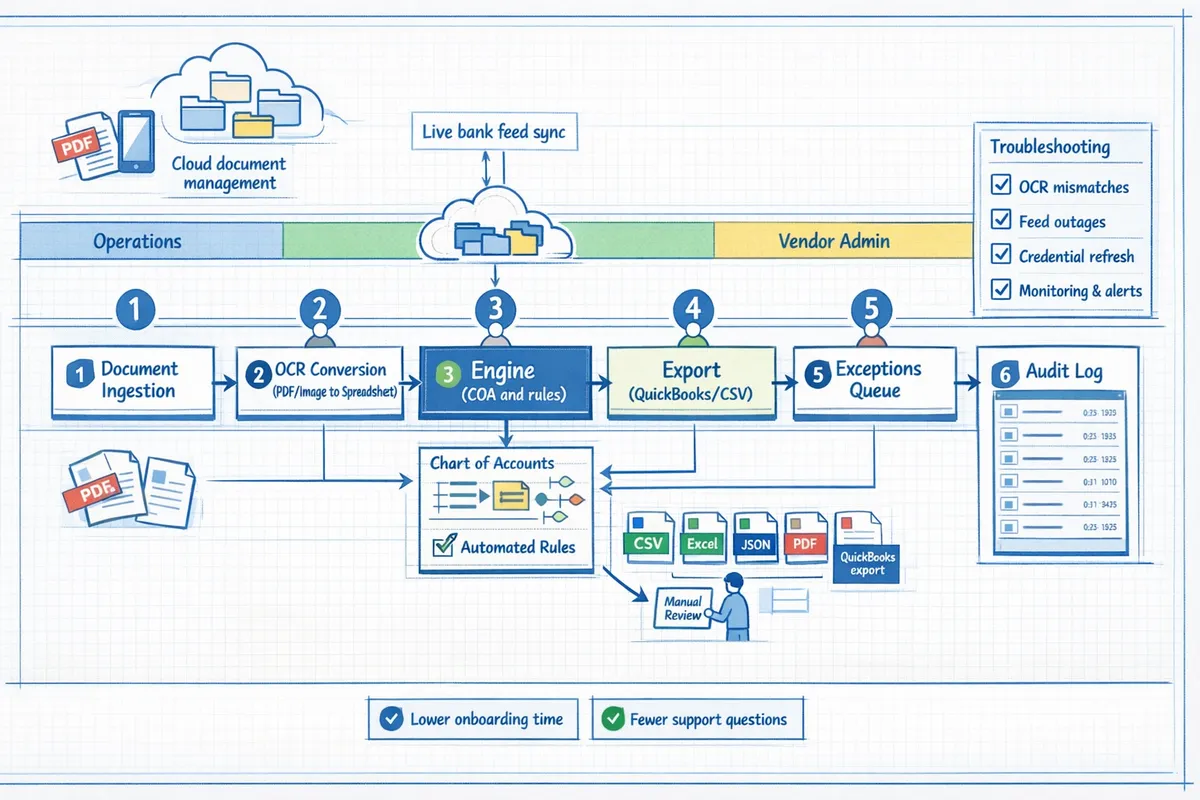
Suggested diagram. Show a left-to-right flow: Email/FTP or Bank API → Rocket Statements ingestion folders → OCR conversion → Mapping engine (COA and rules) → Export (QuickBooks/CSV) → Exceptions queue → Audit log.
Include an operations swimlane that highlights who touches each step (operations, accounting, vendor admin). Visuals lower onboarding time and reduce support questions.
Tips, troubleshooting, and common mistakes
Avoid frequent implementation pitfalls and set up practical checks that keep reconciliations audit-ready. The advice below focuses on debugging OCR mismatches, resolving feed outages, and maintaining trust-account compliance. Each subsection names the likely cause, gives step-by-step fixes, and shows how Rocket Statements reduces ongoing operational work.
Common reconciliation errors and fixes 🔧
Duplicate imports, date parsing mistakes, and vendor name variations account for the majority of manual exceptions. Use these steps to cut exception volume and shorten month-end closes.
- Normalize and deduplicate at import. Create a pipeline that: (a) drops exact-duplicate file hashes, (b) normalizes date formats to ISO 8601, and (c) hashes vendor+amount+date to detect duplicates across feeds. Expected outcome: fewer repeat exceptions from resubmitted PDFs.
- Apply vendor-name normalization rules. Maintain a mapping table (CSV) that maps common variants to canonical names. Use fuzzy matching with a threshold and flag near-misses for human review. Example: map "ACME RENTAL LLC" and "Acme Rentals" to "ACME Rentals".
- Fix date parsing errors. Implement a date-heuristic that checks for implausible future dates and swaps day/month when month>12. Reprocess the affected batch after correction.
Our website's Rocket Statements includes normalization rules and fuzzy matching out of the box, so you avoid building and maintaining these pipelines yourself. For implementation patterns, see our guide on How to Automate Monthly Reconciliations.
Bank feed and credential troubleshooting ⚠️
Expired tokens, rate-limit errors, and broken API endpoints cause silent sync failures that inflate exception queues. Triage these issues with a short diagnostic playbook.
- Check error codes. Distinguish 401/403 (auth) from 429 (rate limit) and 5xx (endpoint). Use logs to map failed syncs to error classes.
- Implement retry and backoff. Use exponential backoff with jitter for 429 and 5xx, and fail fast for 401/403 while triggering a credential rotation workflow.
- Add alerting and health checks. Create an alert if more than N accounts fail within 30 minutes. Surface the specific account ID and last-success timestamp in the alert payload.
Operational burdens for a DIY build include credential rotation, token refresh, quota monitoring, retry logic, idempotency for concurrent writes, and keeping health checks accurate under partial failures. Rocket Statements handles token refresh, queueing, rate-limit backoff, and endpoint health monitoring so your ops team does not maintain that plumbing.
⚠️ Warning: Never store plaintext bank credentials in source control or config files. Use a secrets manager and rotate keys regularly.
Security, access controls, and audit checks 🔒
Role-based access controls, read-only bank connections, and immutable audit logs form the minimum baseline for trust-account compliance. Implement these controls and schedule regular checks.
- Access model. Enforce role-based access with least privilege. Separate duties: reconciliation users, approvers, and admins. Require MFA and SSO for admin roles.
- Credential posture. Use read-only bank credentials where possible and segregate credentials per-entity to avoid cross-account contamination.
- Audit trail. Append immutable logs on every change: who uploaded, who modified mapping rules, and who exported QuickBooks files. Keep a tamper-evident export workflow for auditors.
💡 Tip: Schedule quarterly access reviews and a monthly export of reconciliation logs for the most recent 24 months to simplify audits.
Rocket Statements provides read-only bank syncs, immutable audit logging, and folder-based cloud storage that matches multi-entity workflows used by property managers. See our Property Management page for examples of audit-ready setups.
DIY vs Rocket Statements: operational trade-offs ⚖️
Building an in-house system requires continuous engineering and operations work across many failure modes. Expect to build and maintain:
- Credential management and token refresh routines with secure storage.
- Quota handling and rate-limit monitoring across multiple bank providers.
- Robust retry logic with exponential backoff and idempotency guards for concurrent syncs.
- Race-condition handling when multiple ingest pipelines touch the same ledger rows.
- Cache invalidation and reprocessing hooks for corrected OCR outputs.
- Monitoring, alerting, deployment/versioning, and incident response playbooks.
Each item is ongoing. For example, a single new bank provider can add unique OAuth quirks and rate limits that force engineering changes.
Rocket Statements eliminates that recurring operational surface by providing OCR conversion, cloud storage, live bank sync, and QuickBooks-compatible exports out of the box. Using Rocket Statements lets your accounting team focus on exceptions and controls rather than token logistics. For accountant-centered workflows and conversion use cases, check our Accounting & Bookkeeping overview.
Pre-launch checklist before full automation ✅
Follow this step-by-step checklist before switching from manual to automated runs.
- Validate sample reconciliations. Run 10 representative accounts through the pipeline and compare automated matches to manual results. Record differences and accept/reject thresholds.
- Confirm QuickBooks imports. Export a QuickBooks-compatible file and import it into a sandbox company to verify mapping and account numbers.
- Test exception workflows. Simulate OCR mismatches, duplicate records, and feed outages to confirm notifications and escalation paths.
- Run security and compliance scans. Perform a vulnerability scan of integration points and confirm read-only bank credentials where possible.
- Prepare rollback and communication plans. Define the rollback step, assign owners, and circulate an internal memo for accounting staff explaining the new process.
Expected outcome: a signed-off pilot with acceptance criteria and a rollback plan so month-end runs do not depend on firefighting.
Practical tips to reduce exception volume 💡
Standardize inputs and tighten upstream controls to prevent exceptions from reaching accounting.
- Standardize vendor names using mapping tables maintained in a single CSV or a shared database. Keep a "recent changes" column for auditor traceability.
- Schedule daily feed imports instead of weekly batches to reduce reconciliation backlog and the size of exception sets.
- Require scanned deposit slips for all deposits above a defined threshold to give OCR a second validation source.
- Tune fuzzy match thresholds and review false positives weekly to avoid over-blocking legitimate matches.
Rocket Statements supports cloud-based bank reconciliation for property management firms and helps you convert bank statements to CSV for property managers with standardized exports. For an asset-centric example that reuses bank-statement data, see our guide on How to Automate Asset Valuation from Bank Statement Data.
Frequently Asked Questions
These FAQs address operational and product questions property managers raise when they automate bank statement reconciliation. Each answer highlights practical steps, common failure modes, and how Rocket Statements reduces implementation and maintenance overhead.
How accurate is OCR for bank statements? 🤖
OCR accuracy depends on statement layout, image quality, and vendor tuning; expect most errors on multi-column tables, handwriting, and truncated PDF scans. Rocket Statements extracts printed text reliably for common bank templates but you should measure accuracy before full-scale use.
Measure extraction accuracy by running a validation sample (for example, 200 statements or a statistically significant 5–10% of your backlog). Calculate field-level accuracy: matched fields divided by total extracted fields, and track error types (date parse, amount split, payee line breaks). Improve results with template tuning, column anchors, image pre-processing (deskew, despeckle), and rules that normalize date and amount formats. Rocket Statements provides template editors and a sample-validation workflow so you can iterate until field-level errors drop below your target.
💡 Tip: Validate OCR on a representative mix of statements (multiple banks, paper vs. PDF) and prioritize tuning where 80% of errors occur.
How do I convert bank statements to CSV for property managers? 📄
You convert statements to CSV by running a controlled pipeline: centralize files, run OCR, map columns, validate samples, then export per entity or property. Rocket Statements automates each stage and stores files in per-entity folders.
Step-by-step.
- Centralize files. Ingest PDFs and images into a single cloud folder per bank account or property. Expected outcome: one source of truth; failure mode: duplicate filenames.
- Run OCR. Use Rocket Statements to parse statements and extract transactions into a staging table. Expected outcome: structured rows; failure mode: mis-split columns on complex layouts.
- Map columns. Map extracted fields (date, description, amount, running balance) to your CSV schema. Rocket Statements keeps mapping templates per bank and per entity.
- Validate samples. Export 20–50 rows and reconcile against source PDFs to confirm accuracy.
- Export CSV. Choose per-entity or per-property exports and include account identifiers for downstream imports into accounting systems. See our guide on How to Automate Monthly Reconciliations for recommended export schemas and validation checks.
Can Rocket Statements create QuickBooks-compatible files for reconciliation? 📤
Yes. Rocket Statements can export QuickBooks-compatible files and mapping templates that align with common QuickBooks fields. You should always test imports in a sandbox company file before applying to production.
Testing steps.
- Create a sandbox company in QuickBooks Online or a sample company file in QuickBooks Desktop.
- Export a small batch (25–100 transactions) from Rocket Statements using the QuickBooks mapping template.
- Import into sandbox and inspect account mapping, class/location fields, and duplicate transaction detection.
- Reconcile imported transactions against bank statements in the sandbox and adjust the mapping template if needed.
Common failures include date-format mismatches, duplicate transaction IDs, and unmapped classes. Rocket Statements stores per-entity Chart-of-Accounts mapping to reduce repeat fixes. For accounting teams, our Accounting & Bookkeeping page shows recommended field mappings.
What happens when a bank feed fails or tokens expire? ⛔
When a feed fails or tokens expire, robust systems apply automatic retries, raise operator alerts, and present a single-click re-auth workflow for the affected account. Rocket Statements implements these patterns to minimize downtime.
Operational details you would otherwise need to build: automatic token refresh, credential rotation and secure storage, quota monitoring with backoff, exponential retry logic, idempotent writes to avoid duplicate transactions, and alert throttling to prevent alert fatigue. Best practices: implement exponential backoff for retries, maintain a feed-status dashboard, and send actionable alerts that include the exact account and re-auth link. Rocket Statements maintains feed health logs and can trigger webhook alerts for outages so your ops team can respond quickly.
⚠️ Warning: DIY feed integrations often break when banks rotate certificates or change API scopes; plan for ongoing credential rotation and quota handling.
How do I handle unmatched transactions and exceptions? 🧾
Handle unmatched transactions with an exceptions queue that supports tagging, attaching source documents, and assigning items to reviewers for SLA-based resolution. Rocket Statements includes an exceptions workflow and bulk actions to speed closure.
Practical workflow.
- Auto-match using date, amount, and memo rules. About 70–90% of straightforward matches can be auto-suggested depending on portfolio complexity.
- Route exceptions to a queue with priority tags (high-dollar, vendor-unknown, trust-account mismatch).
- Attach the original statement image and any supporting docs to the exception.
- Assign to a reviewer with a due date and comment thread.
- Resolve and record resolution metadata for audit trails.
For large portfolios, set rules that escalate unreviewed exceptions after 24–48 hours and use suggested-match confidence thresholds to reduce manual review volume.
Does cloud-based bank reconciliation meet audit and retention requirements? 📑
Yes. Cloud-based reconciliation meets audit and retention requirements when the platform provides immutable audit logs, configurable retention policies, and exportable, tamper-evident records. Rocket Statements offers these controls to support audits and compliance workflows.
Key features to verify: detailed action logs that capture user, timestamp, and change diff; immutable exports (signed CSV/PDF snapshots) for point-in-time evidence; configurable retention or legal-hold policies per entity; and role-based access controls to limit who can alter reconciliations. For audit readiness, export monthly reconciliation packets (statement images, CSV exports, exception logs) and store them in an archival location. See our Property Management guidance for audit-focused folder conventions and retention recommendations.
Can this process support multiple entities and trust accounts? 🏘️
Yes. Multi-entity portfolios and trust accounts require per-entity mapping, separate folder structures, and strict export controls to prevent fund commingling, and Rocket Statements is designed to support those needs.
Implementation checklist.
- Create entity records and assign bank accounts to entities.
- Use separate folder trees and access controls for trust and operating accounts.
- Maintain per-entity Chart-of-Accounts and QuickBooks mapping templates so exports contain correct GL and class fields.
- Apply transaction-tagging rules to prevent trust funds from being exported to operating accounts.
- Produce per-entity exports and reconciliation packets for auditors.
For multi-entity rollups, aggregate exports should include an entity ID column for downstream consolidation. Our guide on How to Automate Asset Valuation from Bank Statement Data shows examples of entity-level extraction and mapping.
Next steps to finish your reconciliation setup
By following this guide you should now be able to automate bank statement reconciliation for property management companies, with mapped accounts, OCR-converted statements, CSV/QuickBooks exports, live feeds, and multi-entity handling ready to test. The process reduces manual entry, shortens month-end close, and surfaces mismatches you must review rather than retype.
Rocket Statements is a platform that helps users save time and money by automating the process of converting their statements into spreadsheets as well as manage their documents in the cloud. Try Rocket Statements to run an initial import, verify account mappings, and publish converted files to your accounting system. For implementation patterns and reconciliation workflows, see our guide on how to automate monthly reconciliations and the Property Management industry overview for targeted tips.
💡 Tip: Validate mapped accounts on the first two runs and reconcile any unmatched transactions to avoid downstream posting errors.
Start a free trial of Rocket Statements to test the exact steps you followed. Subscribe to our newsletter for ongoing implementation tips and updates on financial automation for property management. Read more about property-management finance automation at pillar-management finance automation.