
ChatGPT Bank Statement to CSV vs Managed Workflow
ChatGPT Bank Statement to CSV vs Managed Workflow
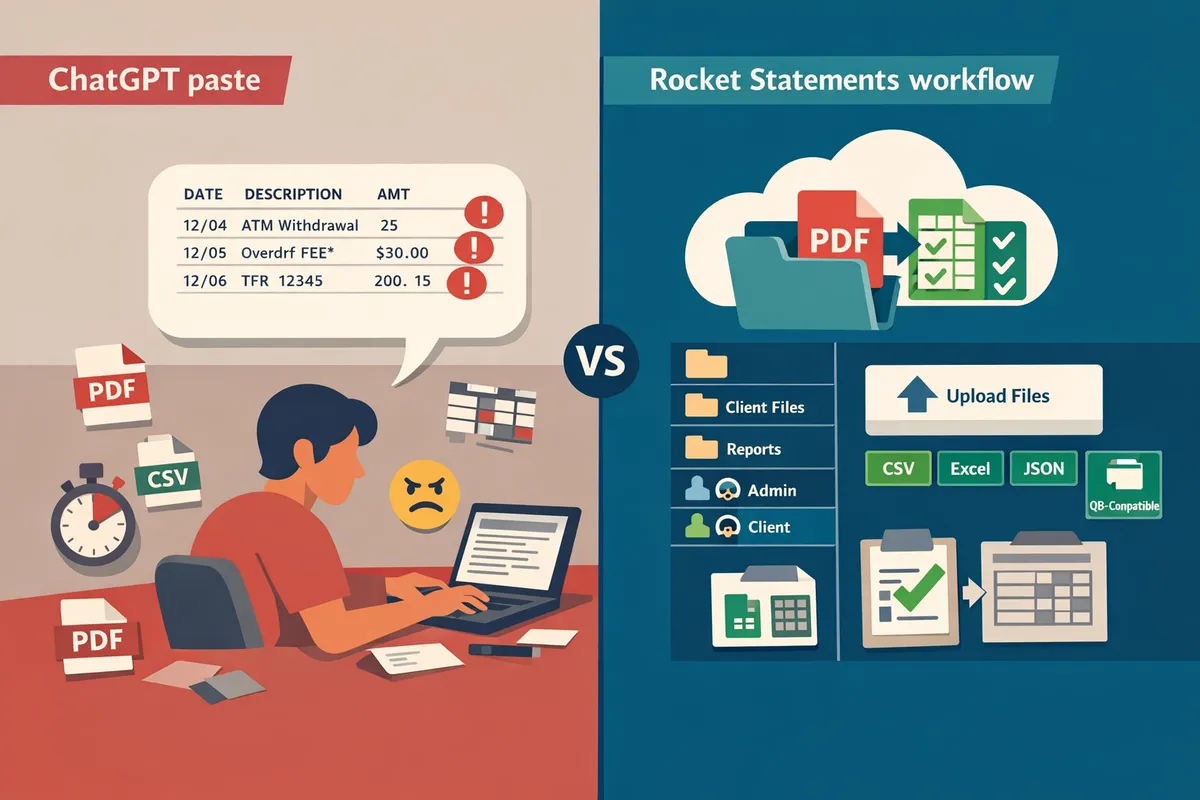
A single misread line in a bank PDF can add an hour to reconciliation. chatgpt bank statement to csv is a prompt-based extraction approach that asks a general-purpose AI to parse a statement PDF and emit CSV rows. In practice, ChatGPT and Claude produce variable column order, inconsistent tagging, and no built-in file management, which creates follow-up work for teams. Our Rocket Statements workflow stores statements in client folders, validates extracted transactions against the statement balances, and exports consistent CSV, Excel, JSON and QuickBooks-compatible files. For a detailed feature comparison, see our Bank Statement Converter: PDF and Image Statements to CSV, Excel and JSON. Which path saves your firm the most billable hours and reduces import errors?
Why pasting bank statements into ChatGPT or Claude fails at client scale
Pasting statements into ChatGPT or Claude fails at client scale because chat tools lack multi-client organisation, repeatable exports, and auditable processing logs. Forum threads and product limits show file-size constraints, hallucinated or missing lines, and no verifiable processing history. These failure modes create rework, compliance headaches, and lost billable hours for firms that handle many clients.
No per-client organisation or secure client portals 📂
Chat-based tools do not provide multi-tenant folders or client portals, so uploaded statements and outputs live inside individual chat histories. That forces staff to manually copy PDFs and extracted CSVs into shared drives, which scatters source files and makes it hard to prove which original file produced a given ledger row. For example, firms that collect client PDFs by email spend extra hours matching files to clients during month-end close. Rocket Statements solves this by storing uploaded PDFs and converted outputs in client folders and portals, enabling direct client uploads and multi-tenant workspaces. See our comparison for accounting teams in Bank Statement Converter for Accounting Firms for how folder organisation reduces manual file handling.
Results buried in personal chat history and not team-accessible 👥
Chat histories belong to a single account and cannot act as a shared, auditable workspace for a team. That ownership model forces administrators to re-run extractions, re-prompt an AI, or copy results into team drives where version history and access records are sparse. Teams lose time on repeated prompts and risk introducing transcription mistakes during manual handoffs. Rocket Statements provides team accounts, shared folders, and the ability to keep the original PDF alongside the exported CSV so everyone sees the same source and output. For firms that push results into spreadsheets, our Google Sheets add-on and Excel add-in keep collaborative work synced without relying on one person’s chat history. Learn more in our guide on how to convert PDF bank statements into Google Sheets.
Inconsistent output formats and repeatability issues 🔁
AI chat responses vary by prompt and context, so CSV columns, date formats, and currency fields differ between runs. That inconsistency forces accounting teams to spend hours normalising columns (date formats, debit/credit flags, payee names) before importing into ledgers. Community threads frequently report mismatched column order and dropped rows after re-running a prompt, which breaks automated imports and slows reconciliation. Rocket Statements enforces consistent export schemas across every conversion and supports CSV, Excel, JSON, and QuickBooks-compatible files. Batch processing and automatic bank-format detection reduce per-file formatting work, so consolidation across months and clients requires far less cleanup. See our Bank Statement to CSV, Excel, JSON & QuickBooks guide for schema examples and recommended import workflows.
No record linking extracted figures back to the source statement 📝
Chat tools do not keep a structured, retrievable link between each converted row and the original PDF image, so auditors cannot trace a posted transaction back to the scanned page. That gap increases compliance risk and makes error investigations time-consuming; staff must manually find the source PDF and re-run or re-verify the extraction. Rocket Statements stores the original uploaded PDF with every conversion and marks where extracted transactions came from, while validating extracted totals against the statement balances so extraction errors surface rather than pass through silently. This combination of retained source and validation reduces the time spent on dispute resolution and audit requests. For more on avoiding phantom transactions, see ChatGPT Bank Statement Extraction: Stop Hallucinations.
Privacy, compliance, and accuracy risks ⚠️
Uploading bank PDFs to a general-purpose chat tool raises privacy and compliance risks because those platforms typically lack firm-level access controls, audit logs, and guaranteed processing records. Users report file-size limits, hallucinated values, and missing rows in public forums and product support threads, which can lead to missed transactions or phantom entries that require billable hours to fix. Rocket Statements provides cloud document storage with folder controls, admin and client permission levels, and processing records tied to each converted file. The product pages describe encryption and compliance controls that address many operational concerns for firms processing client bank data.
⚠️ Warning: Do not treat personal chat histories as an auditable source for client bank statements; use a client portal or managed workflow that records uploads and stores the original PDF alongside exports.

How a managed workflow with Rocket Statements fixes those problems
A managed workflow with Rocket Statements replaces one-off ChatGPT extractions with organised client portals, repeatable exports, and balance-level validation. This matters because teams need auditable file trails, predictable CSVs, and a way to catch extraction errors before they enter bookkeeping systems. The next sections show how those capabilities map to real firm workflows and where ChatGPT-style extractions fall short.
Client portals, multi-tenancy, and folder organisation 📁
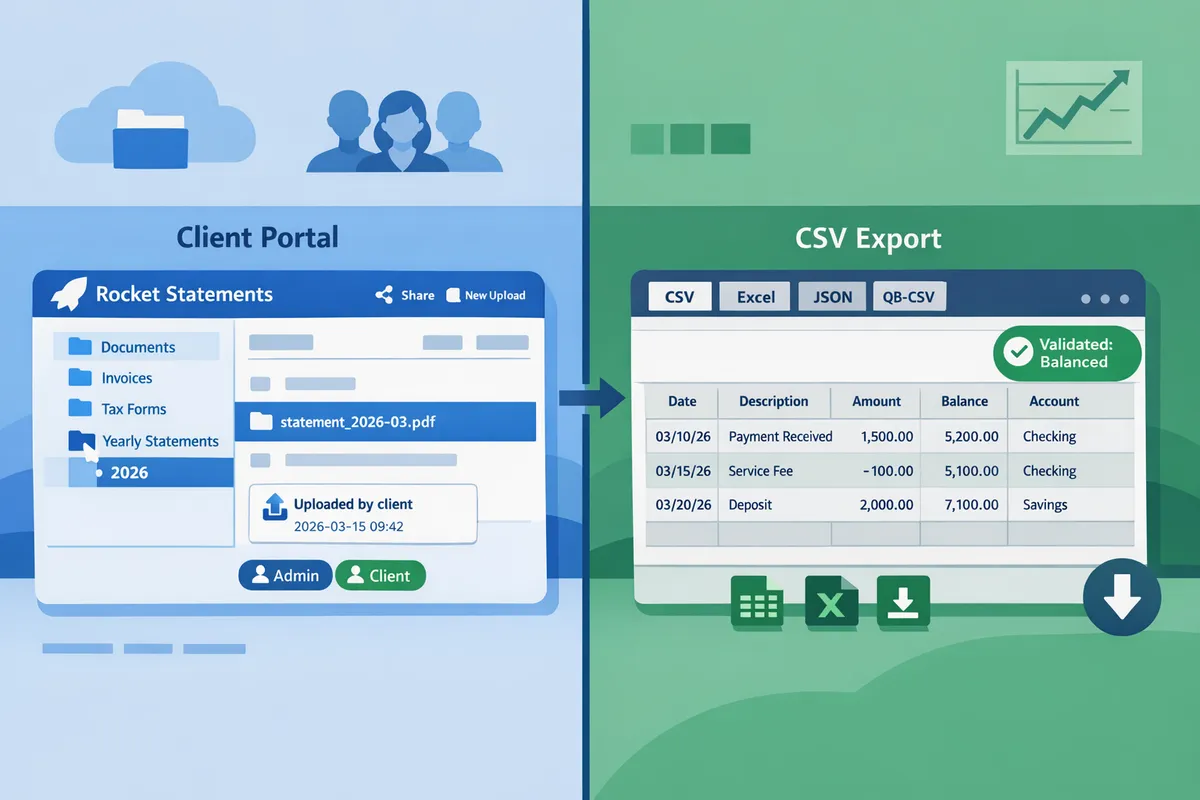
Rocket Statements provides multi-tenant client portals and cloud folders that keep each client's documents separate and auditable. Firms can give clients a branded upload link that drops files straight into the right folder, cutting email attachments and manual routing. For example, an accountant handling 60 clients can remove the weekly task of renaming and filing emailed PDFs because client uploads already land in client-specific subfolders. That centralised repository also makes compliance checks and spot audits faster since the original PDF and converted file sit together with a timestamped activity log. Learn how this centralised approach compares to one-off methods in our Bank Statement Converter for Accounting Firms.
Shared team workspace and simple permission model 👥
Rocket Statements offers team accounts with admin and client permission levels so teams can review and re-download files without relying on a single person's chat account. This prevents lost outputs when staff change roles and supports delegation during month-end close. The two-level permission model reduces setup complexity so firms avoid custom role management while keeping client access separate from internal admin tasks. In practice, firms move review and approval out of private chat histories into the team workspace, which saves time when multiple people need access to the same converted CSVs during reconciliations.
Consistent CSV, Excel, JSON and QuickBooks-compatible exports ✅
Rocket Statements produces consistent, repeatable exports to CSV, Excel, JSON and QuickBooks-compatible files that reduce downstream cleanup. Accountants report that a single misformatted statement can add hours of manual cleanup; consistent exports minimise that variance by using the same column schema and field mapping across clients. Rocket Statements also provides a Google Sheets add-on and an Excel add-in so teams push converted data into the tools they already use with fewer copy and paste steps. If you compare manual ChatGPT outputs to a managed export workflow, the primary savings show up as fewer schema mismatches and less time spent normalising date, sign, and amount formats. See our Bank Statement to CSV, Excel, JSON & QuickBooks guide for export examples and mapping tips.
Validation that reconciles extracted transactions to printed balances 🔍
Rocket Statements validates extracted transactions by reconciling them against the statement's printed balances so extraction errors surface rather than passing through silently. That validation acts as an operational guardrail during batch processing: files with mismatches are flagged for human review while reconciled files proceed to export. For example, during a batch conversion of multiple monthly statements, the team only inspects flagged files instead of manually sampling every file, which reduces blind trust in automated outputs. This approach also eliminates a common failure mode of ChatGPT-based extractions where hallucinated or misread lines can add hours of reconciliation work. For more on hallucination risk, see our analysis in ChatGPT Bank Statement Extraction: Stop Hallucinations.
Security, storage and auditability 🔒
Rocket Statements stores the original PDF alongside the converted file in cloud folders, creating an auditable trail for each conversion. Firms can re-download source PDFs, share folders with colleagues, and show file provenance during audits. Keeping the original and the export together reduces the risk of litigation or tax queries that arise when the converted CSV cannot be traced back to a signed client statement.
💡 Tip: Require clients to upload statements via the portal rather than email to preserve an automatic upload timestamp and folder association.
For details on encryption and processing controls, see our Bank Statement Converter feature page and the guide on converting statements into Google Sheets.
How ChatGPT/Claude and Rocket Statements compare on time, cost, accuracy, and risk
This section compares ChatGPT/Claude and Rocket Statements across time, cost, accuracy, and risk so operations leads and senior bookkeepers can choose the right workflow. Firms should weigh per-file processing time, error-driven cleanup, auditability, and compliance exposure when deciding between ad hoc chat tools and a managed converter.
Comparison criteria to evaluate each option 📊
Core evaluation criteria are time per batch, per-document accuracy, auditability, team access, and compliance risk. Time per batch measures the full work cycle: upload or paste, extraction, manual cleanup, and reconciliation. Per-document accuracy covers OCR and parsing errors that create reconciliation work; a single hallucinated or misread transaction can add hours to a client file, as explained in our article on ChatGPT Bank Statement Extraction: Stop Hallucinations. Auditability captures whether you get verifiable logs, retained originals, and client-folder separation. Team access includes shared workspaces, client portals, and simple permissioning. Compliance risk looks at PII exposure and whether processing leaves an auditable trail.
⚠️ Warning: Do not paste client bank statements or personally identifiable information into public chat tools; that practice increases compliance and breach risk.
Side-by-side comparison table 🧾
The table below compares ChatGPT paste, Claude paste, generic converters, and Rocket Statements across the key criteria so you can scan trade-offs quickly.
| Criteria | ChatGPT paste | Claude paste | Generic converters | Rocket Statements |
|---|---|---|---|---|
| Time for a 10-page batch | Moderate to high (manual copy/paste plus cleanup) | Moderate to high (similar manual flow) | Low to moderate (some offer batch upload) | Low (batch processing with organised folders and exports) |
| Output format consistency | Low (varies by prompt and model) | Low (varies by prompt) | Medium (some formats inconsistent across vendors) | High (consistent CSV/Excel/JSON and QuickBooks-compatible exports) |
| Client-folder support | None | None | Limited or ad hoc | Yes (multi-tenancy and client portals with folders and subfolders) |
| Validation / reconciliation | None (requires manual checks) | None | Varies, usually none | Yes (extracted transactions reconciled against statement balances so errors surface) |
| Team access | Manual sharing only | Manual sharing only | Varies, may lack team workspace | Built-in team accounts with admin and client roles |
| Storage / audit trail | No persistent audit trail | No persistent audit trail | Varies; often limited | Yes (stored originals, processing history, and sharing records) |
| Typical cost profile | Low tool cost but higher hidden billable hours | Low tool cost but higher hidden billable hours | Moderate; may require subscriptions for batch features | Pay-as-you-go or subscriptions; reduces repetitive manual hours |
| Compliance risk | High (PII in third-party chat, no folder segregation) | High | Medium to high depending on vendor | Lower relative risk due to controlled client portals and audit logs |
Pros, cons, and recommended use cases ⚖️
For one-off, low-risk conversions use ChatGPT or Claude; for recurring client work use Rocket Statements for repeatability and auditability. Chat tools pros: no signup, quick for a single page, free or low cost. Chat tools cons: hallucinations, inconsistent formatting, no client-folder support, and no reconciliation; see ChatGPT Bank Statement Extraction: Stop Hallucinations for common failure modes. Generic converters pros: faster batch conversions and lower per-file time. Generic converters cons: inconsistent exports, limited multi-client workflows, and weak audit trails. Rocket Statements pros: consistent CSV/Excel/JSON exports, client portals, cloud folders, Google Sheets and Excel add-ins, and validation that surfaces extraction errors. Rocket Statements cons: requires account setup and uploads; documents are stored in our cloud by design, which is necessary for folders and portals. Recommended use cases:
- ChatGPT/Claude: personal finance or a quick, non-client test file. Avoid for client work.
- Generic converters: single-user shops that need occasional batch speed but not client portals.
- Rocket Statements: accounting firms and bookkeeping teams that process recurring statements, need audit logs, and want repeatable exports. Our Bank Statement Converter for Accounting Firms explains typical firm workflows and common PDF layouts that cause mapping errors.
💡 Tip: Use a short, controlled pilot on representative client PDFs to measure cleanup time before switching workflows.
Try Rocket Statements: validate accuracy with a free trial ▶️
Rocket Statements offers a one-time free trial covering 20 pages so firms can validate accuracy and workflow fit before buying. Use the trial to run these checks:
- Batch a representative set of 10–20 client statements to measure time saved and cleanup needs.
- Test export formats you use (CSV, Excel, JSON, QBO) and import into your bookkeeping workflow.
- Verify client-folder organization and shared access with a colleague.
- Check the reconciliation flags on statements with unusual formats to see error surfacing in practice.
Start by comparing trial results against the manual process described in our Bank Statement to CSV, Excel, JSON & QuickBooks guide and then scale to more clients if the trial reduces your cleanup time and audit risk.
Frequently Asked Questions
This FAQ answers the operational and product questions firms raise when comparing ChatGPT/Claude extraction with a managed PDF-to-CSV workflow. Read these concise Q&A items to decide whether a one-off chat extraction or a managed system like Rocket Statements fits your accuracy, audit, and team-workflow needs.
How accurate is OCR for bank statements?
OCR accuracy depends on scan quality, statement layout, and font consistency. Well-scanned, standard-format PDFs and native text PDFs typically yield far fewer line-level errors than low-resolution images, screenshots, or multi-column, statement-merged formats. For example, firms often sample 10–20 rows across several statement formats to estimate an expected error rate before scaling a workflow. Rocket Statements accepts PDFs and images and encourages sampling across client banks so teams know which statement templates need extra validation.
Can I paste a bank statement into ChatGPT to get a CSV? 🤖
Yes, you can paste statement text into ChatGPT or Claude and ask for CSV output, but results vary by prompt and lack built-in reconciliation or client organisation. Outputs from chat tools often need manual cleanup, and hallucinated or mislabelled transactions can add hours of reconciliation; our article on ChatGPT hallucinations shows a single phantom transaction can add 3–5 hours of work. If you try this route, plan for prompt engineering, repeated validation, and extra storage or naming conventions to keep files auditable.
Does Rocket Statements push transactions directly into QuickBooks or Xero?
No. Rocket Statements does not push transactions directly into QuickBooks, Xero, or Sage; it produces import-ready CSV, Excel, JSON, and QuickBooks-compatible files that you import into your accounting system. Many firms run a quick reconciliation inside Google Sheets or Excel (Rocket Statements has a Sheets add-on and an Excel add-in) before importing to bookkeeping software to map categories and class codes.
Are my uploaded bank PDFs stored and shared?
Yes. Rocket Statements stores uploaded PDFs in cloud folders and supports sharing and re-download so your firm retains an auditable source file for every conversion. That stored source makes month-end audits and client queries faster because you can re-open the original PDF beside the exported spreadsheet. For guidance on folder structure and multi-client organisation, see our bank statement converter resources for accounting firms.
⚠️ Warning: Avoid uploading unredacted sensitive data such as full social security numbers, health records, or PINs. Request masked or redacted statements from clients when possible.
How does Rocket Statements surface extraction errors?
Rocket Statements reconciles extracted transactions against the statement's printed balances so extraction errors surface rather than pass through silently. That reconciliation flags balance mismatches and forces a targeted review of suspect rows so teams fix OCR misreads before importing ledgers. This approach reduces surprise reconciliation hours compared with ad-hoc chat extraction workflows that do not verify printed balances.
Can clients upload their own statements into my account?
Yes. Rocket Statements supports client portals where clients upload directly into their designated folder, saving your team time spent chasing files. Portal uploads land in the correct client workspace with admin and client permission levels, which improves document hygiene and reduces lost or misfiled PDFs. For step-by-step processes that connect portal uploads to Google Sheets or Excel workflows, see our guide on converting PDF bank statements into Google Sheets.
Choose a managed workflow for consistent, auditable CSV exports across clients.
A managed workflow gives repeatable formatting, client portals, and shared folders so teams avoid rework and compliance gaps. If you try chatgpt bank statement to csv for quick prototypes, expect faster first passes but plan for extra reconciliation when a tool hallucinates or mislabels rows. See our write-up on ChatGPT Bank Statement Extraction: Stop Hallucinations for examples of how a single bad row can cost hours.
💡 Tip: Use the free trial to upload a few real PDFs and compare outputs from ChatGPT-style approaches and Rocket Statements to measure cleanup time.
Rocket Statements removes manual transcription by converting PDFs and images into spreadsheet-ready files stored in cloud folders and client portals, so your team gets consistent CSVs across clients. Try Rocket Statements now — start a free trial on the Bank Statement Converter: PDF and Image Statements to CSV, Excel and JSON page to compare workflows. Subscribe to our newsletter for implementation tips and updates.