
Bank Statement Converter for Accounting Firms

Bank Statement Converter for Accounting Firms
A single misread row from a PDF bank statement can add hours to month-end closes and create reconciliation errors that cost billable time. A bank statement converter for accounting firms is a tool that converts user-supplied PDF and image statements into structured, spreadsheet-ready transaction data. This comparison contrasts one-off PDF-to-spreadsheet converters with managed workflows so firms can pick the option that reduces manual entry and fits reconciliation processes. Explore our bank statement converter for export formats and workflows. Rocket Statements replaces manual transcription: clients upload PDFs or images into client portals and folders, conversions export CSV, Excel, JSON and QuickBooks-compatible files, and extracted transactions are validated against statement balances so errors surface rather than pass through silently. Which approach saves the most hours for your team?
The main choices are manual entry, generic OCR tools, and managed PDF-to-spreadsheet converters like Rocket Statements.
Accounting firms choose between manual transcription, one-size OCR tools, or managed converters based on volume, compliance needs, and how much staff time they can afford to spend on cleanup. This section compares those three approaches on accuracy, repeatability, security, and team workflows so you can match a solution to your caseload and reconciliation process.
What a bank statement converter should deliver. ✅
A useful converter delivers validated, consistently formatted transaction data in Excel, CSV, JSON, or QuickBooks-compatible files. Firms need exports that keep the same column schema across clients, support batch processing, and include metadata such as statement dates, account numbers (masked), and running balances so imports do not require per-client reshaping. Required export formats are CSV and Excel for spreadsheet work, JSON for automated tooling, and QBO/OFX or other QuickBooks-compatible files for manual import into accounting systems. Batch processing and consistent column headers reduce repeat cleanup. According to the Bank Statement Converter page, Rocket Statements exports CSV, Excel, JSON, and QuickBooks-compatible files and provides Google Sheets and Microsoft Excel add-ins to speed downstream reconciliation.
💡 Tip: Always run a balance check on the first few converted statements before doing a bulk import to your ledger.
How manual entry and generic OCR fail at scale. 📉
Manual entry and generic OCR tools create inconsistent naming, lost metadata, and variable column formats that increase cleanup time. Generic OCR often misses line breaks, concatenates payee and memo fields, or drops transaction IDs, which forces staff to reconcile dozens of ambiguous lines. Our benchmarks show small accounting firms commonly spend 4–10 hours per client each month reconciling OCR errors; that workload multiplies quickly across an entire client roster. The business impacts are clear: wasted billable hours, more reconciliation rework, higher audit exposure from missing metadata, and slower month-end closes. For example, if a five-person firm supports 10 clients and each client requires 4–6 extra hours because of inconsistent OCR output, that becomes 40–60 hours of avoidable work every month.
Relevant reading: compare free AI OCR tools against pro workflows in Bank Statement Converter Features in 2026: Free AI Tools vs Pro Workflows (Benchmarks + Checklist).
Why managed PDF-to-spreadsheet workflows are different. 🗂️
Managed converters provide repeatable outputs, folder organisation, team access, and client portals that reduce per-statement cleanup. A managed workflow stores documents in cloud folders and subfolders, enforces consistent export schemas across clients, and gives teams a single workspace so one person does not have to rescript or reformat outputs for every engagement. Rocket Statements supports multi-tenancy, team accounts, and client portals so clients upload directly into the correct client folder and teams share the same conversion settings. The product also validates extracted transactions by reconciling them against the balances printed on the statement so extraction errors surface instead of passing through silently. These features cut the average time per statement by reducing manual transcription, avoiding ad-hoc scripts, and creating predictable exports that import cleanly into spreadsheet tools or accounting packages.
See the client upload and portal workflow for examples at Client Portals for Collecting Bank Statements & Financial Documents. Rocket Statements offers a one-time free trial that covers 20 pages so firms can test end-to-end conversions and folder workflows before committing.
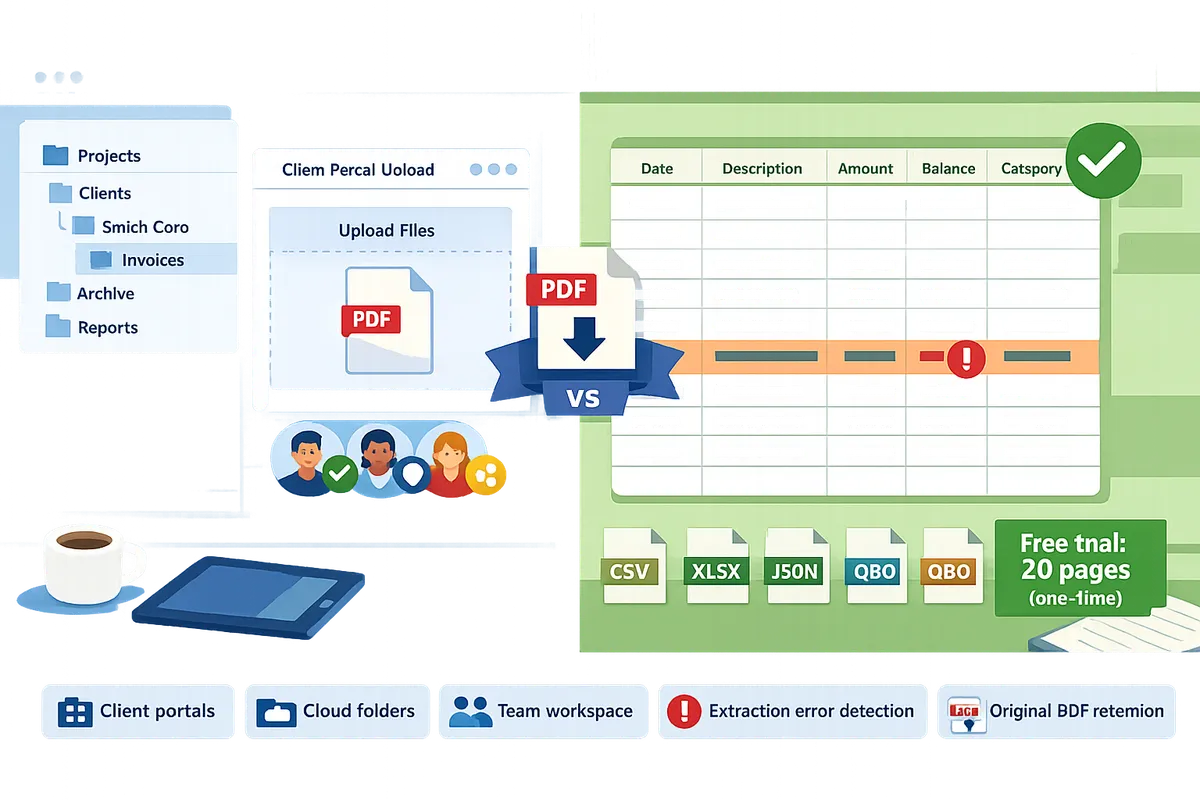
Evaluate candidates by five operational criteria: client portals, cloud folders, team workspace, extraction error detection, and original PDF retention.
Use these five operational criteria to judge whether a bank statement converter for accounting firms will scale with your workflows and audit needs. These items form a short RFP checklist you can use when scoping pilots, estimating onboarding time, and comparing total cost of ownership. Ask vendors for example runbooks and SLA expectations tied to each criterion.
Client portals for direct uploads 📤
Client portal bank statement upload must route files directly into the correct client workspace and capture uploader metadata. Look for portals that enforce file types (PDF, JPG, PNG), require a short folder selector or naming field at upload, and record who submitted each file and when. Email attachments and ad-hoc file shares create misrouting, missing files, and security gaps once you scale beyond a handful of clients. Rocket Statements provides client portals that route uploads into the firm workspace and keep folder association for every client, reducing time spent hunting for misplaced statements. For implementation comparisons, see our guide on client portal workflows in the Bank Statement Converter for Accountants and Bookkeepers.
💡 Tip: Require a short naming convention or folder selector in the portal to reduce misfiled uploads.
Cloud folders and subfolders for traceable storage 📁
Cloud folders must hold source PDFs and converted outputs in a clear client and engagement hierarchy with versioning and role-limited sharing. Look for folder hierarchies, per-engagement subfolders, downloadable originals, and share links that respect role permissions. Flat storage or single-bucket approaches make audits harder because they obscure who supplied which file and when. Rocket Statements stores source PDFs and converted files in folders and subfolders, supports secure share links, and makes originals downloadable so reviewers and auditors can find the source quickly. For workflow patterns that map conversions into accounting imports, read Bank Statement to CSV, Excel, JSON & QuickBooks.
Team workspace and multi-tenancy for controlled collaboration 👥
A multi-user team workspace must provide role-based access and client-level segregation so staff can collaborate without exposing unrelated clients. Firms with growing headcount need central accounts, role controls, and tenant separation to avoid risky file copies and duplicated effort. Single-user tools force manual handoffs and increase billable-hour waste during month end. Rocket Statements supports team accounts and multi-tenancy so firms centralize document handling, reduce duplicate work, and keep user permissions consistent across clients. For a feature checklist that helps small firms compare free AI tools versus pro workflows, see Bank Statement Converter Features in 2026: Free AI Tools vs Pro Workflows (Benchmarks + Checklist).
Extraction error detection that reconciles outputs ⚠️
Extraction error detection must surface mismatches by reconciling extracted transactions against the statement's printed balances. Basic OCR often misreads subtotals, flips debit/credit signs, or drops low-contrast lines; those silent errors show up later as reconciliation drift or investigate-only items. Ask vendors how their system flags balance mismatches, reports missing lines, and presents candidate corrections for reviewer approval. Rocket Statements validates extracted transactions by reconciling them to the printed statement balances so errors surface for review before you import files into accounting software.
⚠️ Warning: Accepting unvalidated outputs increases the chance of reconciliation drift and audit issues.
Preserve the original PDF for auditability and client queries 📎
Retaining the original source PDF alongside converted data is essential for traceability and audit responses. Teams need a one-click way to pull the uploaded PDF when a client questions a transaction or when an auditor requests source documentation. Tools that discard originals or scatter them across drives force extra retrieval work and increase the risk of missed evidence. Rocket Statements preserves the uploaded PDF and makes it re-downloadable with the converted CSV, Excel, JSON, or QuickBooks-compatible export so staff have single-click traceability.
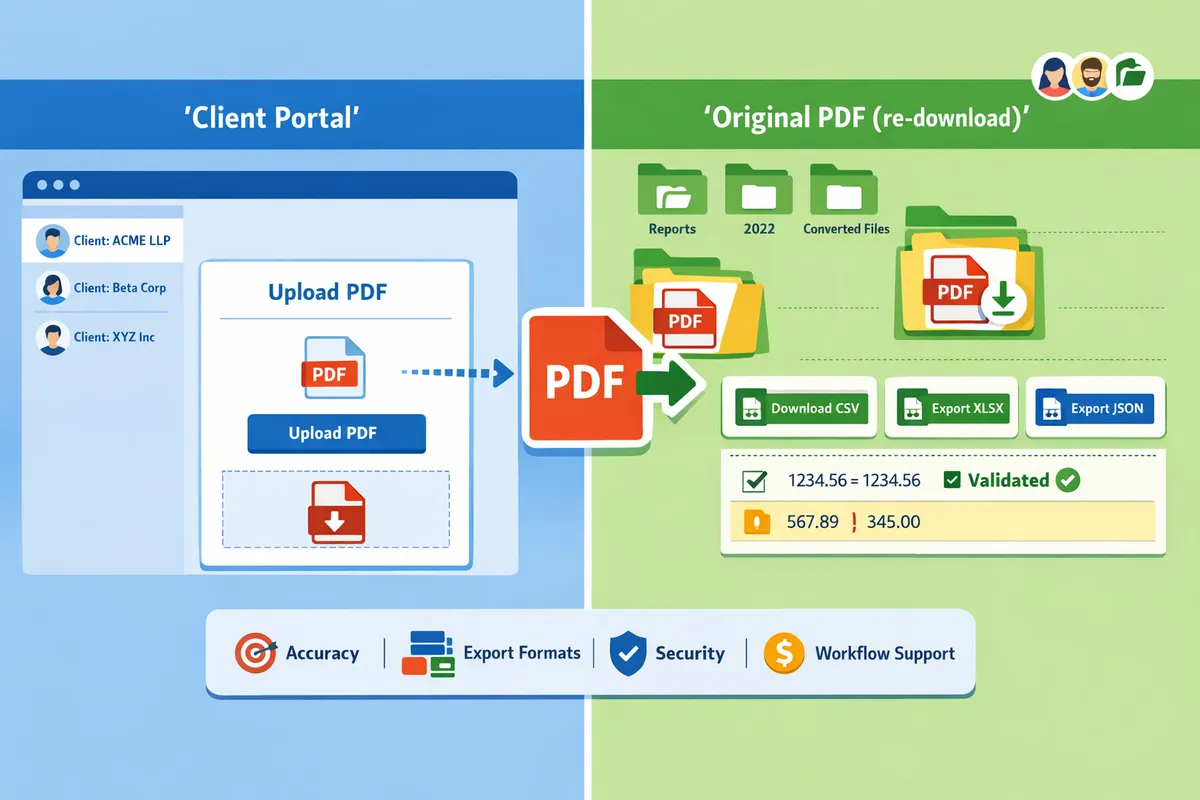
A side-by-side comparison should weigh accuracy, output formats, security, pricing, and workflow support to match a firm's needs.
Compare candidates across accuracy, export formats, security controls, pricing, and workflow support so you match a solution to your firm's volume and compliance needs. Choosing the wrong approach costs billable hours, causes reconciliation delays, and increases compliance friction. Use the matrix below to scan gaps quickly and read the pilot checklist to prove outcomes before you commit.
Comparison matrix 📋
The table below compares Manual entry, Generic OCR tools, and Managed converters against the operational criteria accounting firms use to decide.
| Solution type | Accuracy & validation | Supported inputs | Export formats | Batch processing | Client portal support | Team / multi-tenancy | Document retention | Security / compliance indicators | Trial / pilot terms | Pricing model |
|---|---|---|---|---|---|---|---|---|---|---|
| Manual entry | Low; errors depend on staff skill and QA. | Any printable source (PDF, image, paper) but requires manual upload/transcription. | Any digital format staff create (Excel/CSV). | No native batch. Scales linearly with headcount. | No. Firms usually build their own portals or email requests. | No. Files live in individual drives or practice management folders. | Retention depends on firm policy; manual backups required. | Compliance risk depends on firm controls; manual audit trails weak. | No trial; internal time-and-motion pilot only. | Labor cost (hourly); hidden recurring cost in billable hours. |
| Generic OCR tools | Medium; good on clean, consistent layouts but brittle across banks. | PDF, JPG, PNG; performance drops on scanned copies and mixed formats. | Excel, CSV often available but formatting inconsistent. | Some support bulk uploads but require heavy cleanup. | Rare; third-party file storage or ad hoc file shares. | Limited; usually single-user or basic team accounts. | Varies by vendor; some temporary storage only. | Variable security; check encryption and retention policies. | Free trials common but limited benchmarking value. | Freemium or per-page with pay-as-you-go; hidden cleanup costs. |
| Managed converter (Rocket Statements) | High; extracts transactions and surfaces extraction errors by reconciling against the statement balance. | PDF and image files (PDF, JPG, PNG); handles scanned statements. | Excel, CSV, JSON, and QuickBooks-compatible exports (QBO/OFX); original PDF available for download. | Designed for batch jobs and recurring folders. | Yes; client portals route uploads into the correct client workspace. | Yes; multi-tenant workspaces and team accounts. | Cloud folders and subfolders with sharing and download of originals. | Vendor-provided access controls, audit logs, and platform-level protections; firms should verify independent attestations. | One-time 20‑page free trial to validate outputs. | Per-page credits or subscription tiers; predictable monthly pricing available. |
Refer to our feature benchmarks in the article on bank statement converter features in 2026 for sample layout-specific failure modes and time-to-cleanup comparisons.
Pros and cons of each approach ⚖️
Manual entry, generic OCR, and managed converters present distinct trade-offs in cost, error risk, and onboarding effort.
Manual entry. Pros: no vendor onboarding and no dependency on an external parser. Cons: high recurring labor costs and elevated error rates. Example: a single misread transaction can add three billable hours to a month-end close. For a small firm processing 200 statements a month, that scales to dozens of extra staff hours and delayed reconciliations. Manual also increases compliance exposure because audit trails and access controls live inside general file stores, not a centralized portal.
Generic OCR. Pros: faster than typing and often low initial cost. Cons: inconsistent outputs across different bank templates and poor error detection at scale. Benchmarks and our editorial reviews show small firms spending about 4–10 hours per client monthly fixing OCR mismatches. Generic tools reduce transcription time but push hidden cleanup onto staff and still require manual QA and folder organization.
Managed converters (Rocket Statements). Pros: repeatable, consistently formatted exports, client portals, team workspaces, and balance-based validation that surfaces extraction errors instead of passing them through. Cons: requires vendor onboarding and a predictable per-page or subscription cost. The business outcomes: fewer downstream reconciliation exceptions, less time spent on manual cleanup, and a centralized audit trail that supports compliance reviews. Rocket Statements also provides Google Sheets and Excel add-ins to shorten the path from export to reconciliation templates.
Recommendation and pilot checklist ✅
Firms with recurring statement volumes should pilot a managed converter to measure hours saved and error reduction before a full rollout.
- Select 20–50 representative pages across 5–10 clients (include scanned statements and multi-page statements).
- Convert pages and validate that exported columns map to your reconciliation template (date, description, amount, running balance, transaction type).
- Test client portal uploads with 2–3 real clients to confirm folder routing and user permissions.
- Verify team access controls and audit logs for user activity and downloads.
- Measure cleanup time per page before and after conversion and convert that to billable hours saved.
- Compare total cost: vendor fees plus residual cleanup versus continued staff hours.
💡 Tip: During the pilot, require clients to upload one or two statements via the portal and time your staff’s review; that single data point shows real operational savings far better than vendor claims.
Rocket Statements offers a one-time 20-page free trial you can use to complete steps 1–4 without a developer build. Use the pilot results to decide whether to scale by client group or firm-wide.
For deeper benchmarks and a checklist that distinguishes free AI converters from pro workflows, see our analysis of bank statement converter features in 2026 and our practitioner guide Bank Statement Converter for Accountants and Bookkeepers.
Frequently Asked Questions: Practical answers for firms choosing a bank statement converter.
This FAQ supplies direct, operational answers accounting firms use when evaluating a bank statement converter for accounting firms. Each item focuses on vendor-selection and operational checks you can run during a pilot. Use the answers below to build a short vendor checklist and pilot plan for your team.
How accurate is OCR for bank statements? 🔍
OCR accuracy for bank statements depends primarily on source quality and layout consistency. Scanned images, low-resolution PDFs, multi-column layouts, and statements with overlapping marks produce more extraction errors. Validate outputs by reconciling extracted transaction totals against the printed statement balances and by sampling statements from the clients who send the worst-quality files. For selection, require vendors to show extraction error detection and reconciliation checks during your pilot so you see error rates on your actual documents; Rocket Statements flags extraction issues by reconciling against statement balances so errors surface instead of passing silently. For benchmarking, compare vendor performance to the metrics in our feature checklist for 2026 to estimate likely manual cleanup hours: see Bank Statement Converter Features in 2026: Free AI Tools vs Pro Workflows (Benchmarks + Checklist).
Can Rocket Statements handle scanned or image statements as well as PDFs? 🖼️
Yes. Rocket Statements accepts both PDF and image files (for example JPG and PNG) supplied by the firm or clients and converts them into structured, spreadsheet-ready transaction data. The platform stores uploaded source files in client folders so teams can re-download originals for audits or client queries. During pilots, test a representative set of scanned receipts, older bank prints, and image screenshots to confirm accuracy on your real inputs; Rocket Statements processes those file types and includes validation against statement balances so extraction errors become visible.
Does Rocket Statements push transactions directly into QuickBooks, Xero, or Sage? 🔁
No. Rocket Statements does not connect via OAuth or push transactions directly into accounting packages. Rocket Statements exports QuickBooks-compatible files and other formats that accounting staff import into accounting software manually or with an import routine. If your workflow requires direct pushes, plan for a brief manual import step or a connector built by your bookkeeping team; for many firms this avoids the security and permission work required by direct integrations. See our guide on exporting to accounting formats for typical import workflows: Bank Statement to CSV, Excel, JSON & QuickBooks.
How is document security and compliance handled? 🔒
Security practices vary by vendor; ask for encryption-at-rest, role-based access, and audit logs as a minimum. Confirm whether the provider supports per-client isolation, separate client folders, and controlled sharing so you limit who can view sensitive statements. Rocket Statements stores documents in cloud folders with team accounts and client portals, and it provides access controls and audit trails for user actions; review the vendor security documentation and request evidence such as SOC 2 or similar attestations where available.
⚠️ Warning: Before onboarding, verify the vendor's data retention and deletion policies for client data to match your firm’s compliance and retention rules.
What export formats should my firm require? 📁
Require CSV and Excel as baseline exports and add JSON or QuickBooks-compatible files when you import programmatically or use bookkeeping software. Ask vendors to demonstrate their Google Sheets add-on and Microsoft Excel add-in during the pilot so you see how edits and downstream formulas behave. Rocket Statements exports CSV, Excel, JSON, and QuickBooks-compatible files and offers a Google Sheets add-on plus an Excel add-in, which lets your team test full end-to-end workflows without building custom scripts. Use a sample reconciliation that ends in your general ledger import to confirm format fidelity.
How do trial and pilot programs typically work? 🧪
A useful pilot processes real client statements, measures time saved, conversion accuracy, and workflow fit under production-like conditions. Ask for a no-risk pilot with a defined page allowance, production-like folders and users, and the ability to run client uploads through a client portal. Rocket Statements offers a free trial that covers 20 pages one time in total; use that allowance to test a worst-case batch and a typical-month batch and track the manual cleanup minutes saved per statement.
💡 Tip: In pilots, measure both time saved and error rate. Track time spent fixing extraction errors on 10 representative statements so you can project monthly billable-hour savings.
Choosing the right statement workflow
A bank statement converter for accounting firms reduces manual entry and delivers consistent, spreadsheet-ready transaction data across every client.
Rocket Statements replaces the manual work of transcribing transactions off a bank, credit card, or financial statement into a spreadsheet. The user uploads a statement PDF or image they already have; the product converts it into structured, spreadsheet-ready transaction data. PDF-to-spreadsheet conversion is the product's highest-value job and should be the centre of gravity of all content.
It is a managed workflow, not a one-off conversion, and that is the differentiator against pasting a statement into a general AI chat tool like ChatGPT or Claude: documents live in the cloud with folder organisation, clients upload directly through client portals, results are repeatable and consistently formatted across every statement and every client, and teams share one workspace.
When you compare free OCR tools and pro workflows, measure repeatability, error surfaceability, and how client uploads fit into your reconciliation process; see our feature comparison in Bank Statement Converter Features in 2026: Free AI Tools vs Pro Workflows (Benchmarks + Checklist) and the practical guide to bank statement pdf to spreadsheet for examples of real firm trade-offs when evaluating pdf bank statement to excel for accountants.
Start a free trial of Rocket Statements (20 pages, one time) to test your typical client statements and folder workflows.
💡 Tip: Use the trial on a mix of scanned and digital PDFs to check consistency across clients.
Create your first conversion on the Bank Statement Converter page and subscribe to our newsletter for implementation tips and workflow updates.