
Automatically Sync Bank Transactions in 2026: The Accounting Workflow Automation Playbook for QBO, Xero, Zoho, Sage, FreshBooks, and Wave

Automatically Sync Bank Transactions in 2026: The Accounting Workflow Automation Playbook for QBO, Xero, Zoho, Sage, FreshBooks, and Wave
Duplicate imports and mismatched formats can add hours to month-end close for small accounting teams. Automatically sync bank transactions is a workflow that keeps live transaction feeds and converted statement files aligned across accounting platforms. Rocket Statements helps our users save time and money by automating conversion of PDF and image statements into spreadsheets, managing documents in cloud folders and subfolders, syncing live transaction data, and exporting CSV, Excel, JSON, and QuickBooks-compatible files. Our bank statement converter and two-lane workflow guidance show practical steps to avoid duplicate entries and date-format headaches. Which approach reduces errors and billable hours more: a managed platform like Rocket Statements or a DIY workflow stitched from scripts and CSV exports?
What are the core principles for automatically syncing bank transactions?
The core principles are secure credential handling, consistent data formats, and an auditable reconciliation trail. These minimum controls reduce manual cleanup, stop duplicate imports, and make audits faster. Teams that mix live feeds and file imports report 8–12 hours of monthly cleanup from outages and duplicates; see our reliability matrix and outage playbook for examples.
How do live bank feeds differ from CSV or QBO imports? 🔁
Live bank feeds push transactions continuously, while CSV and QBO imports deliver batched historical snapshots. Live feeds reduce the lag between when a transaction posts and when it appears in bookkeeping, which supports day-to-day cash management and exception spotting. CSV and QBO imports give a repeatable snapshot you can use for migrations, audit trails, or month-end backfills because they package many transactions in one, verifiable file.
Running both methods at once creates a high risk of double-posted transactions. For example, if a bookkeeper keeps live sync enabled and a monthly QBO import runs for the same account, duplicate detection must run before posting. Rocket Statements supports a two-lane workflow and explains conflict scenarios in the discussion "Two-lane workflow: live bank sync + PDF exports — how do you avoid dupes?" which shows step-by-step safeguards.
💡 Tip: Run duplicate-protection rules and a one-way import flag when you operate both live feeds and file imports to avoid double-posted transactions.
Read our post on Managing Live Bank Sync vs. PDF Exports for examples of duplicate risks and versioning.
What security and compliance controls should you require? 🔒
Require tokenized access, bank-grade encryption in transit and at rest, and an immutable audit log for any automated sync. Tokenized access removes the need to store raw credentials, encryption protects data across transport and storage, and immutable logs provide an auditor-ready trail that shows who imported what and when.
Also require folder-level access controls, export history, and the ability to revoke or expire third-party access quickly. These features reduce the risk of over-privileged service accounts and make post-incident remediation measurable. Rocket Statements provides cloud document management with folder and subfolder permissions and keeps export histories so teams can show audit evidence without rebuilding events; see our Accounting & Bookkeeping hub for workflow examples.
Which data-quality checks prevent duplicate or misdated entries? ✅
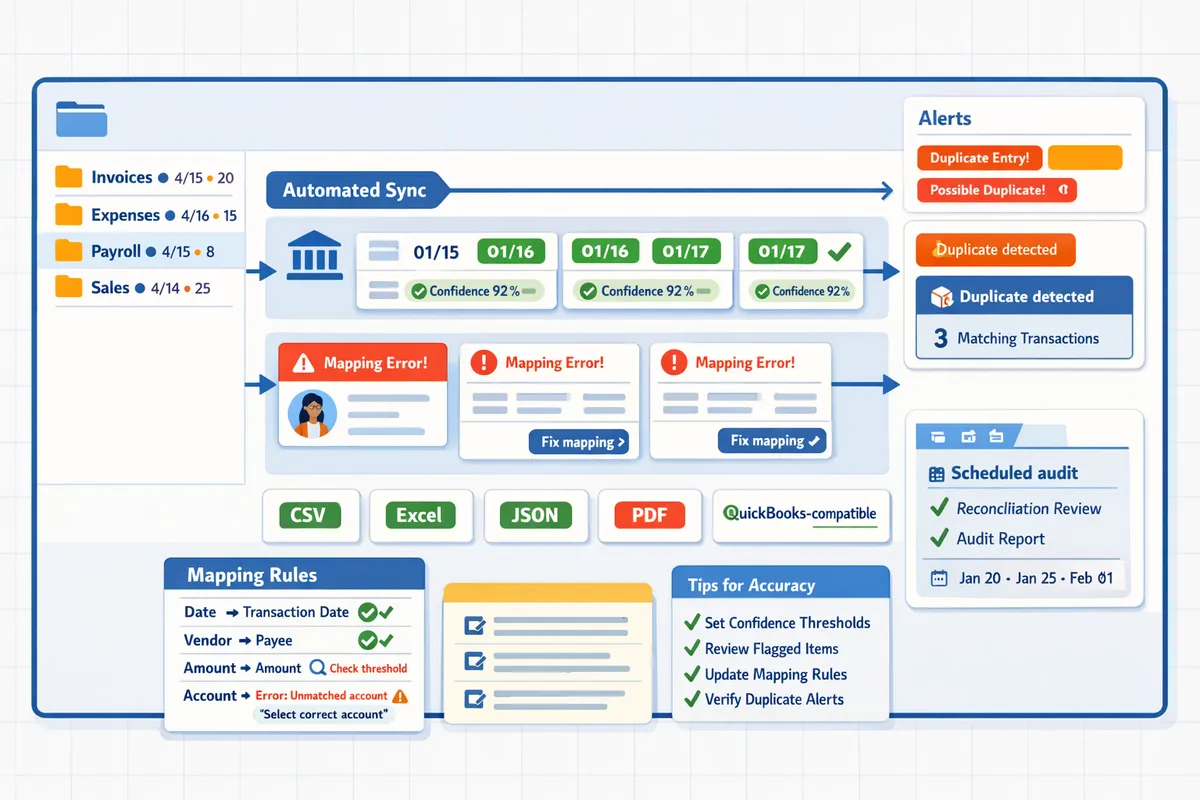
Date normalization, transaction fingerprinting, and reconciliation flags stop duplicates and correct common format shifts. Normalize dates to a single canonical format such as YYYY-MM-DD before matching. Transaction fingerprinting (matching on amount, merchant name variants, and normalized date) identifies likely duplicates even when merchant strings differ slightly.
Apply mapping rules that standardize merchant names, currency symbols, and sign conventions before export to accounting systems. For example, map "ACME, LLC" and "ACME LLC" to the same vendor code and convert debit/credit signs consistently so QuickBooks or Xero import templates do not produce offsetting errors. Rocket Statements implements date-format fixes and QuickBooks-compatible exports to reduce import failures and speed reconciliation; our guide on QuickBooks & Xero Bank Statement Automation in 2026 shows common mapping rules and error fixes.
What proven strategies and techniques ensure reliable automated bank-syncs?
A reliable automated bank-sync uses a hybrid two-lane workflow, precise mapping with confidence thresholds, and scheduled reconciliation audits to keep day-to-day bookkeeping accurate and auditable. These three controls reduce duplicate imports, shorten month-end cleanup, and preserve a statement-based trail for external review. Rocket Statements supports each step by handling PDF-to-spreadsheet conversion, live transaction syncs, and export formats compatible with QuickBooks and other platforms.
How does a two-lane workflow run live syncs and PDF exports together? 🔀
A two-lane workflow is a hybrid process that keeps near-real-time transaction feeds for bookkeeping on one lane and periodic statement PDF exports for audits and month-end on the other. This pattern reduces daily reconciliation friction while keeping a verifiable statement trail for auditors and tax reviewers. Practical setup steps: enable continuous bank feeds into your accounting app for transaction-level bookkeeping, schedule weekly or monthly PDF exports from Rocket Statements for the same accounts, and tag those exports with the statement period before import.
Avoid duplicates by using dated import windows and a single source-of-truth flag on each transaction. For example, mark PDF-exported transactions as "statement-verified" in your bookkeeping checklist and configure your import rules to ignore already verified dates. Rocket Statements' discussion of a tested two-lane workflow shows a sample checklist and export naming convention you can copy. See the detailed process in our post on Two-lane workflow: live bank sync + PDF exports — how do you avoid dupes?.
⚠️ Warning: Failing to tag PDF-exported statements or using overlapping import date ranges is the single biggest cause of duplicate entries across bookkeeping systems.
How do you set up mapping and auto-categorization rules? 📊
Auto-categorization is a rules-based process that assigns categories to transactions based on merchant, account, and amount patterns; implement it by mapping at the account and merchant level, holding low-confidence matches in a review queue, and expanding rules after validation. Start by extracting your top 10 highest-volume merchants from Rocket Statements' conversions, create explicit mapping rules for those merchants, and test for two weeks.
Operational steps: 1) export a 30-day sample from Rocket Statements, 2) build merchant-level mappings in your accounting app or within Rocket Statements' export templates, 3) set a confidence threshold (for example, 85%) to send anything lower to a review queue, and 4) maintain a weekly audit log of overridden categories. This reduces correction time because you tackle the highest-impact rules first. Rocket Statements' QuickBooks-compatible exports and CSV templates simplify the mapping step and cut manual adjustments.
💡 Tip: Start with rules for the top 10 merchants and a two-week validation window; that yields most of the error reduction with minimal rule bloat.
Live feeds vs CSV/QBO imports vs Rocket Statements: feature comparison 🧾
A side-by-side comparison shows live feeds require the least day-to-day handling but have higher outage and duplication risk, CSV/QBO imports give maximal control at the cost of ongoing manual work, and Rocket Statements combines both approaches to improve audit readiness and reduce duplicate imports. The table below compares setup time, maintenance, duplicate risk, historical import quality, audit readiness, and best use cases.
| Method | Setup time | Daily maintenance | Duplicate risk | Historical import quality | Audit readiness | Best for (use case) |
|---|---|---|---|---|---|---|
| Live bank feeds (direct) | Low to medium | Low | Medium to high during outages | Medium (depends on backfill tools) | Low to medium | Operations teams needing near-real-time books; see Managing Live Bank Sync vs. PDF Exports for outage handling. |
| CSV / QBO imports (manual) | Medium | High | Low if disciplined | High when templates match bank output | High (statement-backed) | Solo owners or firms that prefer control over automation and can staff imports. |
| Rocket Statements (hybrid exports + live sync) | Medium | Medium | Low (built-in dedupe and statement tagging) | High (PDF-to-CSV conversions and backfills) | High (exports include statement PDFs and QBO-ready files) | Small teams and multi-entity firms that need audit trails and lower cleanup hours; see our export-workflow discussion for templates. |
Solo owners with a single account often find CSV/QBO imports cost-effective. Small bookkeeping teams and multi-entity firms typically prefer a Rocket Statements hybrid approach to balance daily accuracy and audit readiness.
How to implement and measure an automated bank-sync workflow
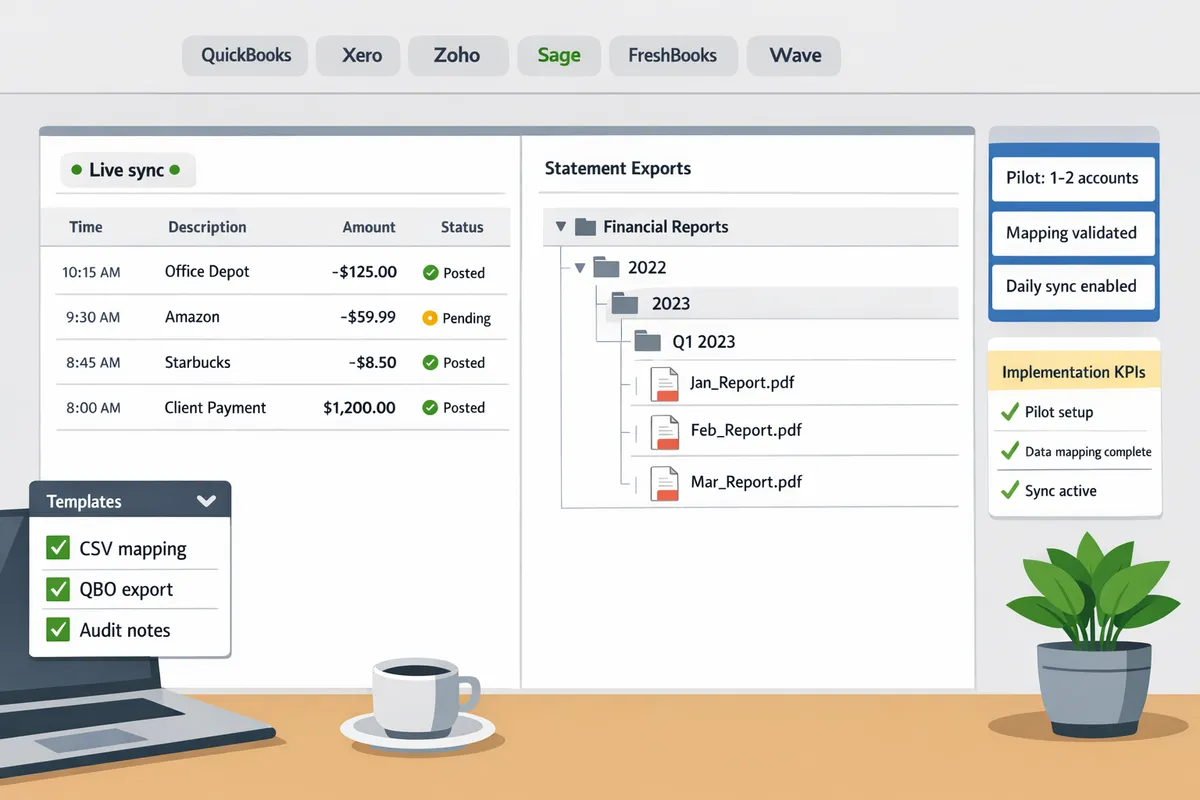
A phased rollout with defined roles and measurable KPIs reduces risk and proves ROI before you scale an automated bank-sync. Start with a 1–2 account pilot to validate mapping and reconciliation rules, then expand while tracking time saved, duplicate counts, and exception resolution rates.
⚠️ Warning: Keep raw bank credentials and long-term access tokens out of shared spreadsheets; store them in a secure credential manager or Rocket Statements' protected settings.
What is the phased rollout plan for small accounting teams? 🛠️
Start with a controlled pilot of one to two operating accounts, then expand in three phases: validation, scale, and backfill. 1) Pilot: pick the highest-volume operating account and one credit card or merchant account. Use Rocket Statements to run both lanes—the live feed and PDF-to-spreadsheet conversion—to reveal merchant name variations and date-format issues without risking all accounts. 2) Validate: confirm category mapping accuracy, reconciliation rules, and duplicate-detection thresholds. Log every mapping change and keep an audit copy of original PDFs in Rocket Statements' cloud folders. 3) Scale and backfill: add remaining live feeds and import historical statements in small batches, validating balances after each batch.
Reference: review our two-lane workflow notes for avoiding duplicate imports in the pilot phase.
Which KPIs should you track to measure ROI? 📈
Track time-per-reconciliation, duplicate imports prevented, month-close days, and exceptions resolved to quantify ROI. Measure a four-week baseline before automation and compare the same period after pilot completion. Use these KPI definitions and quick formulas:
- Time-per-reconciliation. (Average hours spent reconciling an account per period.)
- Duplicate imports prevented. (Count of duplicate transactions caught by de-dup logic.)
- Month-close days. (Calendar days from period end to final close.)
- Exceptions resolved. (Number of items cleared from the exceptions queue per week.)
Example framing: if reconciliation drops from 10 to 3 hours on an account, multiply hours saved by your staff cost to show monthly savings. Rocket Statements helps by exporting reconciliation reports and CSV audit packets you can use in stakeholder ROI summaries. For a deeper reliability and ROI comparison between live feeds and CSV/QBO imports, see our reliability matrix and outage playbook.
How should you manage exceptions and audit requests? 🧰
Create an exceptions queue that logs source file, import attempts, error type, and a short remediation checklist for each item. Capture these fields for every exception: account, original file link, import timestamp, parser error (merchant name mismatch, date parse failure, amount mismatch), assigned owner, and resolution notes. Triage with three priorities: P1 (balance-impacting), P2 (mapping or memo fixes), P3 (cosmetic or tagging).
Remediation steps to standardize:
- Verify the original statement in Rocket Statements and annotate the offending line.
- Correct the mapping or merchant name in the conversion settings and reprocess the single statement.
- Re-import the single corrected file to the accounting system and mark the queue item resolved with a short audit note.
- Export an audit packet (CSV/Excel/PDF) that includes the original statement link and import log for external requests.
This queue and audit-packet workflow shortens auditor follow-ups and produces consistent evidence for tax and compliance reviews. For QBO-specific import formatting and pre-import checks, consult our QuickBooks import guide.
Frequently Asked Questions
This FAQ answers the practical questions accountants and bookkeepers ask when they automatically sync bank transactions. The answers focus on accuracy, hybrid workflows, platform compatibility, security, and how Rocket Statements fits into a reliable automation stack.
How accurate is OCR for bank statements? 🧐
OCR accuracy depends primarily on statement quality and consistent statement layouts. Clean, digitally generated PDFs with embedded text and consistent column layouts yield the highest line-level extraction rates; photographed or scanned images with glare, skew, or handwritten notes reduce accuracy. Rocket Statements provides template-based processing and per-line confidence scores so teams can route low-confidence lines into a review queue. For new statement providers, run a short verification pass (first 2–4 statement batches) to tune templates and date/amount formats. Without a review queue and template tuning, expect more manual corrections and longer month-end close times.
💡 Tip: Flag lines under your confidence threshold (for example, 80–85%) and require one quick verification pass before approving a new statement provider.
Refer to our QuickBooks & Xero bank statement conversion guide for common mapping fixes and image-prep recommendations: QuickBooks & Xero bank statement conversion guide
Can I run live bank feeds and CSV/QBO imports without creating duplicate transactions? 🔁
You can prevent duplicates by enforcing a single source of truth per account and using duplicate-detection rules. A practical two-lane workflow keeps one lane for continuous live feeds and a second lane for file-based backfills or historical imports; mark file imports as one-way and pause live syncing for accounts during the import window. Rocket Statements supports one-way import flags, date-range checks, and duplicate protection that compares unique identifiers, amounts, and timestamps before posting. Operational discipline matters: document which accounts use live feeds, which use file imports, and who owns switching the source of truth. See our two-lane workflow discussion for step-by-step examples and configuration patterns: Two-lane workflow discussion
Which accounting platforms work best with automatic bank sync? ⚙️
QuickBooks Online, Xero, Zoho, Sage, FreshBooks, and Wave all support bank feeds or statement imports, and the best fit depends on your reconciliation cadence and audit needs. Live feeds suit teams that reconcile daily or need near-real-time cash position updates. File imports suit month-end controlled snapshots, audit trails, and backfills. The table below summarizes practical fits for each platform.
| Platform | Best-fit workflow | Feed type | Practical notes |
|---|---|---|---|
| QuickBooks Online | Continuous bookkeeping and daily reconciliation | Live feeds + CSV/QBO imports | Strong third-party integrations; good for firms that need automated backfills. |
| Xero | Automated bank rules and frequent reconciliation | Daily feeds + CSV imports | Good bank rule engine for auto-categorization; useful for multi-currency firms. |
| Zoho | SMBs with integrated operations | Live feeds & CSV | Suitable when bookkeeping sits inside a broader Zoho stack. |
| Sage | Mid-market accounting with regional bank differences | Varies by region (feeds + imports) | Expect setup variance by bank; plan a pilot. |
| FreshBooks | Small businesses with low transaction volume | Limited feeds + imports | Best for invoice-led workflows; may need file exports for heavy transaction loads. |
| Wave | Freelancers and micro-SMBs | Manual imports + some feeds | Cost-sensitive option; manual imports are common for complex statements. |
For feed reliability and outage planning across these systems, see our reliability matrix and outage playbook: https://www.rocketstatements.com/blog/automatically-import-live-bank-transactions-in-2026-reliability-matrix-bank-feed-outage-playbook-for-quickbooks-xero-sage-freshbooks-wave-and-zoho
How does Rocket Statements handle PDF-to-QBO conversions? 📄➡️📂
Rocket Statements converts PDFs and images into import-ready CSV, Excel, JSON, and QuickBooks-compatible files while preserving the original source documents for auditability. Upload or auto-process bank statement emails, then Rocket Statements applies OCR, maps fields to your QBO template, assigns per-line confidence scores, and stores the source PDF in cloud folders linked to the export. Teams can export QBO/QFX/QBO-compatible files for import or use Rocket Statements' QuickBooks Online integration to push transactions while keeping the original PDFs attached. This workflow reduces manual reformatting, preserves traceability, and simplifies post-import reconciliation. See practical conversion workflows and export tips in our bank statement converter documentation and the two-lane workflow examples: bank-statement-converter and two-lane workflow discussion
What security measures protect bank sync credentials? 🔐
Secure bank-sync solutions use tokenized access, encryption in transit and at rest, role-based access controls, and comprehensive access logs. Require any vendor to document how they store and refresh access tokens, how long they retain raw credentials, and whether administrators can revoke access centrally. Rocket Statements stores connection tokens and documents access events so teams can audit who accessed which account and when. Grant least-privilege access, rotate vendor tokens periodically, and use multi-user approvals for adding new bank connections.
⚠️ Warning: Avoid vendors that ask for raw username/passwords without tokenization or that cannot produce a documented credential retention policy.
How much time can automation save my bookkeeping team? ⏱️
Automation typically reduces hours spent on manual entry and reconciliation, but exact savings depend on transaction volume, exception rates, and the number of accounts. Measure ROI with a simple pilot: record baseline hours for month-end tasks across a sample of accounts for 30 days, enable an automated lane in Rocket Statements for the same accounts for a month, then compare hours, exceptions per 100 transactions, and time to close. Example (illustrative): a solo bookkeeper who spends 10 hours monthly on 200 transactions could cut manual entry time to 2–3 hours after automating imports and mapping, turning 8+ hours saved into billable capacity or reduced labor cost. Use our reliability matrix and outage playbook when calculating expected downtime and worst-case rework: https://www.rocketstatements.com/blog/automatically-import-live-bank-transactions-in-2026-reliability-matrix-bank-feed-outage-playbook-for-quickbooks-xero-sage-freshbooks-wave-and-zoho
Choose a managed platform to reduce manual cleanup and speed month-end close.
Adopting a tested workflow will cut hours of reconciliation and stop duplicate imports. For accounting workflow automation 2026, compare live sync reliability, CSV/QBO import complexity, and the business cost of manual fixes before committing to a DIY build. If your priority is consistent month-end timing, automatically sync bank transactions to remove repetitive reformatting and human error.
Rocket Statements is a platform that helps users save time and money by automating the process of converting their statements into spreadsheets as well as manage their documents in the cloud. The product has the following features:
- Convert their PDF and image statements into spreadsheets
- Manage their documents in the cloud with folders and subfolders
- Sync live transactions data from bank accounts
- Transform their statements into CSV, Excel, JSON, and PDF files
- Transform their statements into QuickBooks-compatible files
Schedule a consultation with Rocket Statements to audit your current feeds and map a two-lane approach that uses live sync where reliable and PDF exports as a controlled fallback. Read our Two-lane workflow: live bank sync + PDF exports — how do you avoid dupes? for practical setup tips.
💡 Tip: Start by automating the three accounts that cause the most manual cleanup; improvements compound quickly.