
Accounting Automation for CPA Firms in 2026: How to Automate Bank Statement Conversion, Client Portals, and QuickBooks‑Ready Exports

Accounting Automation for CPA Firms in 2026: How to Automate Bank Statement Conversion, Client Portals, and QuickBooks-Ready Exports
A single misread digit in a bank statement can force a CPA team to spend 10+ hours reconciling records. Bank statement automation for CPAs and accounting firms is software that converts PDF and image statements into Excel, CSV, JSON, and QuickBooks-ready files. Our Rocket Statements platform automates PDF bank statement to Excel conversion, offers client portals for secure uploads, and stores files in cloud folders and subfolders. Rocket Statements' AI-powered bank statement converter detects bank formats, batch-processes PDFs and images, syncs live transactions, and exports QBO, OFX, CSV, or Excel for reconciliation. The system uses bank-level encryption and automated processing described in our bank-statement PDF converter. Explore Accounting Automation best practices in our industry resources. Which workflows cut hours while keeping client data audit-ready?
Bank statement automation centralizes data capture and cuts manual posting time. What core requirements should CPAs set for bank statement automation?
Require a system that extracts structured transactions from PDFs and images and exports them in accounting-ready formats. This prevents repeated manual entry, preserves a thread of source documents, and reduces month-end reconciliation time. The checklist below covers functional outputs, security and compliance controls, and the export and integration capabilities firms must demand when evaluating vendors or internal builds.
Extraction outputs and processing expectations 🤖
Extraction must produce normalized transaction rows (date, amount, running balance, payee, transaction type) plus source metadata and export to CSV, Excel, JSON, QBO, and OFX. Firms should expect the following features and outputs when assessing a vendor:
- Standardized row fields: transaction date, posted date (if present), debit/credit amount, balance, payee/description, bank account identifier, and statement filename. This reduces mapping work during import to accounting systems.
- Multiple export formats: CSV and Excel for ad hoc analysis; JSON for integrations; QBO and OFX for QuickBooks and bank import workflows. Rocket Statements' Bank Statement Converter converts PDF and image statements into Excel, CSV, JSON, QBO, and OFX with batch processing and automatic bank-format detection.
- Batch processing and bank-format detection: automatic recognition of bank templates and scanning of multi-page PDFs so firms avoid manual template setup for each client. For example, a mid-size tax practice processing 150 monthly statements should require batch conversion and template detection to prevent an extra 10–20 minutes per file of manual cleanup.
- Accuracy controls: confidence scores per row, duplicate detection, and a reconciliation-ready preview showing original PDF snippets alongside extracted rows.
- Metadata and audit linkage: include page numbers, source file name, upload timestamp, and user who uploaded the document so every exported row traces back to the original file.
Refer to Rocket Statements' Bank Statement Converter for vendor-specific details and supported export formats.
Client portals are web-based upload and workflow tools that collect documents while preserving audit trails. What security and compliance controls must firms require? 🔒
Client portals are web-based upload and workflow tools that collect documents while preserving audit trails, and they must enforce encryption in transit and at rest, role-based access control, and immutable audit logs. Demand specific security controls and evidence from any vendor:
- Encryption and data handling: TLS for uploads, AES-256 (or equivalent) at rest, and clear data residency and retention policies. Rocket Statements' Client Portals for Collecting Bank Statements & Financial Documents supports encrypted upload routing and cloud file management.
- Access and identity controls: SSO support, mandatory MFA for staff accounts, and role-based permissions that separate uploader, reviewer, and approver roles to reduce accidental exposure.
- Auditability and logging: immutable audit trails with timestamps, user IDs, and file-hash linkage so you can show exact who/when/what for regulators or clients.
- Compliance artifacts to request: current SOC 2 Type II or ISO 27001 report, PCI DSS evidence if payment data is present, and a vendor data processing addendum that meets your jurisdictional privacy requirements.
💡 Tip: Require double opt-in for client portal invites and log the consent timestamp to reduce account-takeover and consent disputes.
For implementation guidance, compare client onboarding flows in our article on Streamlining Client Onboarding: Why Accounting Firms Need Bank Statement Conversion Tools.
Exports and integrations that speed month-end close 🔁
Exports must include QuickBooks-compatible QBO files, consistent CSV/Excel with mapped field names, and options for API or file-sync delivery to client folders. Prioritize these capabilities to eliminate rekeying and shorten close cycles:
- QuickBooks compatibility: native QBO export or ready-to-import QBO packages that preserve memo, payee, and cleared status. Rocket Statements can convert statements into QuickBooks-compatible files for direct import.
- Bank-format mapping and templates: ability to apply or save per-client mapping rules so recurring clients do not require reconfiguration each month.
- Attachment and source chaining: export should attach the original PDF or provide a direct link back to the client portal entry so reconciliations show source documents.
- Transfer methods: support scheduled SFTP, API push, or direct cloud-folder sync (Google Drive, OneDrive, or your document management system) to place converted files where your team already works.
- Exception reporting and error handling: exports should include a short exceptions file listing rows with low confidence, ambiguous payees, or duplicate warnings so bookkeepers can clear issues quickly.
A practical evaluation checklist:
- Can the vendor export QBO and OFX without manual reformatting?
- Does the tool preserve original PDFs alongside converted rows?
- Are mapping templates reusable across client entities?
- Is there a scheduled sync or API to push files into your firm's cloud folders?
- Does the system produce an exceptions report and link each exception back to the source page?
See our procedural guide on How CPAs Can Automate Bank Statement Imports for Faster Month-End Reporting for step-by-step implementation examples.
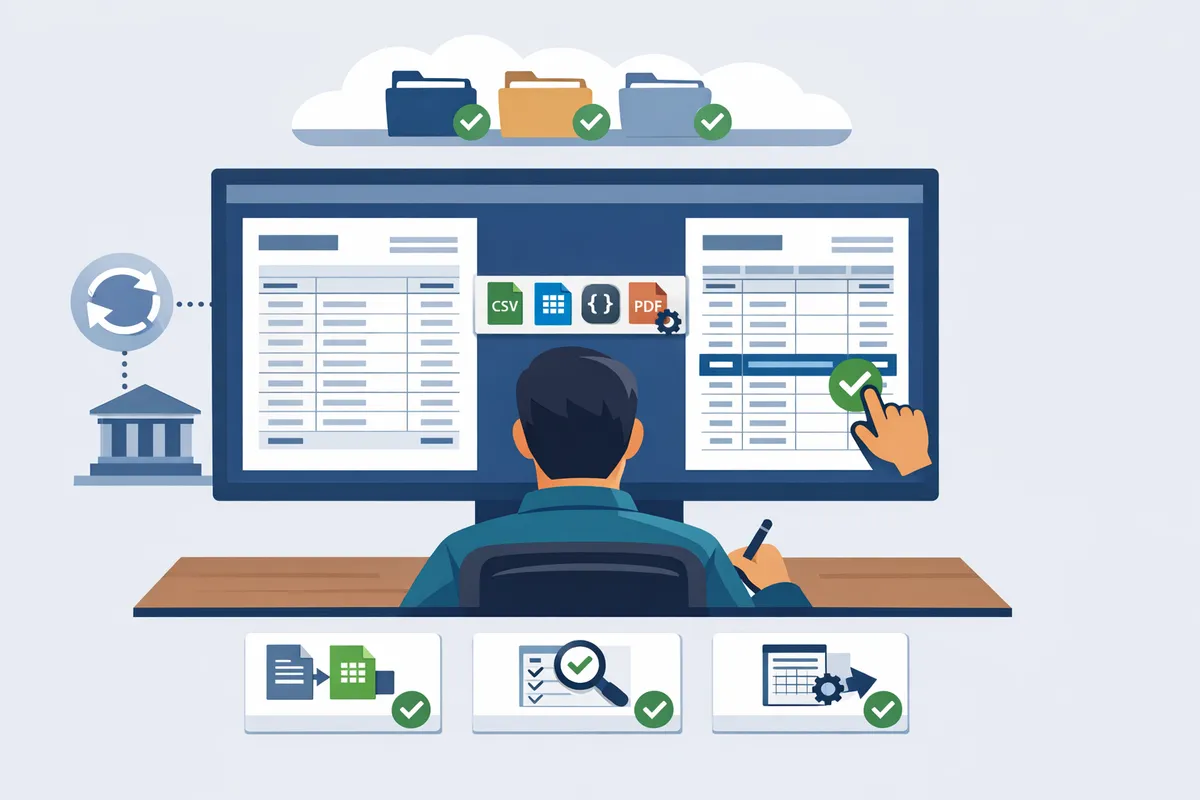
Proven strategies combine automated conversion, client portals, and human review to cut errors. How do firms implement practical workflows to automate bank statement conversion and client portals for accounting firms?
Combine automated conversion, client portals, and targeted human review to reduce posting errors and accelerate month-end close. Our website recommends designing intake as a single source of truth, running scheduled batch conversions with bank-format detection, and routing exceptions to a rules-based review queue. These steps cut repetitive rekeying and versioning while preserving an audit trail that accountants need for compliance.
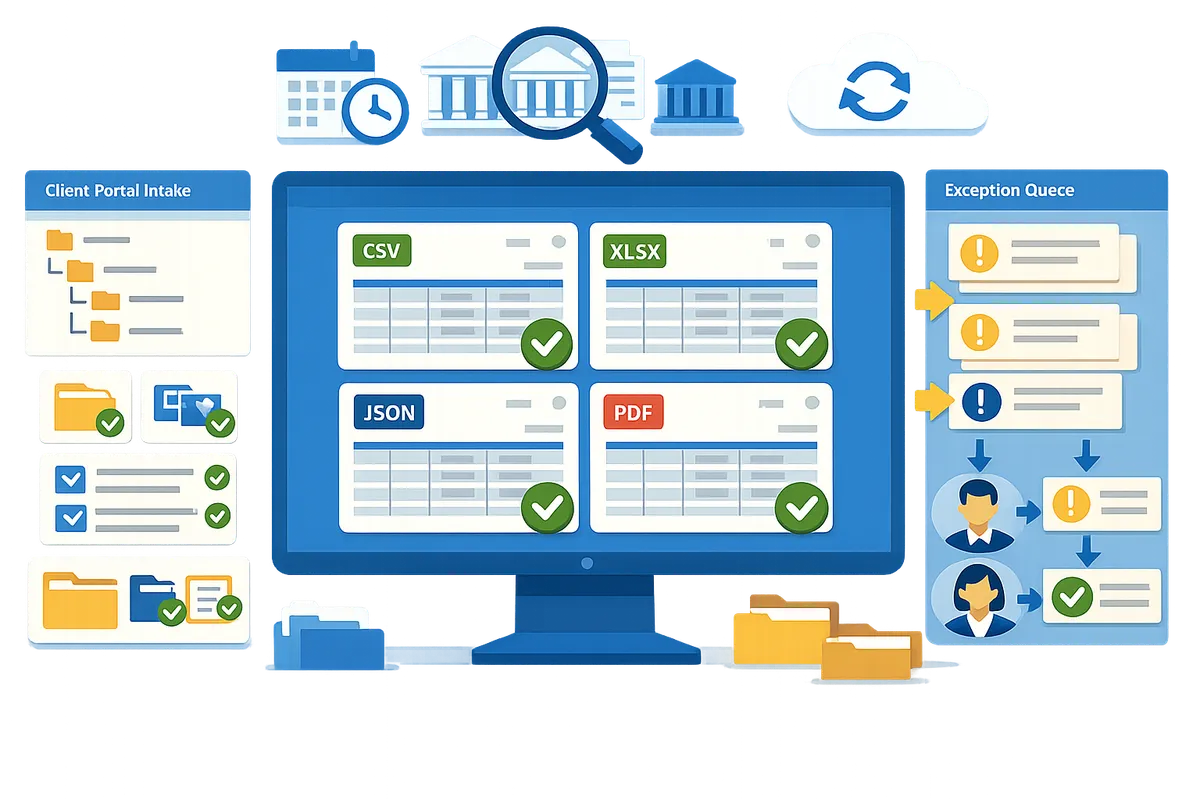
Designing client intake and portal workflows 📁
Client portal is a platform that serves as the single intake point, enforcing folder structure and required metadata on upload. Use a consistent folder and metadata scheme so staff and automation always know what each file contains. Example folder structure: Client / Year / Bank Name / Account Ending XXXX / Statement Period. Required metadata fields should include entity name, statement start and end dates, account type, last four digits, and upload source (PDF, image, bank export).
Routing rules should automatically place uploads into the correct processing queue and assign preparers by entity or account type. Provide clients with short, client-facing upload instructions (accepted formats, naming convention, how to handle multi-page PDFs) and embed those instructions inside the portal. Rocket Statements' client portals collect uploads, tag files with metadata, and route them directly into conversion workflows—see our Client Portals for Collecting Bank Statements & Financial Documents for setup examples.
Batch processing and bank-format detection ⚙️
Batch processing is scheduled bulk conversion that runs bank-format detection and converts statements in groups to minimize manual intervention. Configure nightly or weekend batch jobs that pull files from a designated portal folder, run automatic bank-layout recognition, and place results into review or export locations. Start by validating detection on a representative sample of files: pick 20–50 statements, confirm correct field mapping, then expand the batch window.
Best practices include keeping an "on-demand" button for urgent clients, isolating known problematic formats into a manual queue, and preserving original PDFs for audit. Rocket Statements offers automatic bank-format detection and a batch processor that you can schedule or trigger from portal uploads; see How CPAs Can Automate Bank Statement Imports for Faster Month-End Reporting for a step-by-step rollout example.
Rules-based exception queue and human review ✅
A rules-based exception queue is a triage system that categorizes extraction issues and routes them to reviewers with clear SLAs. Define exception categories such as unreadable image, mismatched running balance, split merchant lines, or multi-account statements. For each category assign an SLA (for example: high-priority exceptions resolved within one business day; routine exceptions within three business days) and a reviewer role.
Track each exception with tags, timestamps, and comment history so auditors see who changed what and why. Feed corrected records back into the platform as training examples or mapping overrides to reduce repeat errors. Rocket Statements captures comment history and tagging on exceptions, making it straightforward to audit decisions and improve extraction accuracy over time.
💡 Tip: Preserve the original PDF and require a short error code in reviewer comments to speed later audits and compliance checks.
Vendor feature checklist: compare capabilities across vendors 🧾
A feature checklist table reveals functional gaps across vendors so firms can align procurement to workflow needs. Map your must-haves (PDF-to-Excel conversion, client portals, QuickBooks-ready exports, batch processing, security and audit features) against each vendor to expose hidden integration and operational costs.
| Feature | Rocket Statements | Typical alternatives |
|---|---|---|
| PDF bank statement to Excel/CSV/JSON | Yes — AI-powered conversion and export to Excel, CSV, JSON | Partial — often requires manual mapping or separate OCR tools |
| Client portals for accounting firms | Yes — upload, metadata, routing and client instructions built in ([client portals doc]) | Varies — may require separate portal product |
| QuickBooks-compatible exports (QBO/OFX) | Yes — native export to QuickBooks-ready formats ([bank statement converter]) | Limited or requires custom mapping |
| Batch processing & bank-format detection | Yes — scheduled batches and automatic layout detection | Often limited; many vendors need manual configuration per bank |
| Security controls and compliance | Yes — bank-level encryption and compliance features ([bank statement PDF converter]) | Varies by vendor; may lack enterprise controls |
| Audit trail, tagging, exception history | Yes — built-in comments, tags, and exception queue | Often basic or absent |
| Onboarding time | Hours to days with templates and portal presets | Weeks for custom integrations |
| Pricing model | Transparent per-page or per-seat options | Complex enterprise pricing, add-on fees common |
Use this checklist alongside operational criteria—onboarding support, client training materials, and how a vendor maps exceptions—to choose a solution that actually reduces staff hours. For practical playbooks and use cases, see Streamlining Client Onboarding: Why Accounting Firms Need Bank Statement Conversion Tools and From PDFs to CSVs: Real Use Cases for Bank Statement OCR & Automation.
A staged rollout with playbooks and KPIs limits disruption while proving value. How should CPA firms implement bank statement automation and measure results?
Run a staged rollout—pilot, parallel run, go-live, and scale—guided by written playbooks and a small KPI set to limit client friction and protect auditability. This approach lets firms prove time savings and accuracy improvements on a handful of accounts before broad adoption. Rocket Statements' client portals and conversion engine fit into each phase to automate uploads, conversion, and audit logs.
Build onboarding playbooks for small, mid, and large firms 🗂️
Create three size-specific playbooks that use the same four phases: pilot, parallel run, go-live, scale. A sample small-firm timeline: pilot 1–2 clients (1 week), parallel run with live posting checks (2 weeks), go-live for the full practice (1 week), scale to new clients (ongoing). A mid-size firm should pilot 3–5 representative clients (2 weeks) and run parallel posting for 4 weeks before rolling out by practice area. Large firms should pilot 5–10 strategic clients (4 weeks) and deploy in regional waves with an 8-week parallel run.
What each playbook must contain. 1) Roles and responsibilities: partner sponsor, automation owner (senior manager), client success coordinator, IT/security liaison. 2) Client tasks: portal invite, example upload, statement naming convention, and consent for document storage. 3) Internal tasks: mapping checks, reconciliation checklist, exception routing, and month-end cutover plan. 4) Communication templates: kickoff email, upload reminder, and exception notice that reference Rocket Statements' secure upload links and folder structure.
Use Rocket Statements' client portals to route uploads and notify clients automatically during pilot and parallel runs. Sample message: "Please upload last three months' statements to our secure portal (Rocket Statements) by [date]. We will run a parallel import and confirm balances before going live."
Which KPIs should firms track to measure success? 📊
Track a short list of operational KPIs: per-statement processing time, extraction accuracy measured as exceptions per 1,000 lines, exception resolution time, client upload rate, and cost per statement. Per-statement processing time shows throughput gains. Extraction accuracy (exceptions per 1,000 lines) reveals data quality and the human-review burden. Exception resolution time measures how quickly staff clear mismatches that block posting.
How to capture these metrics. Use Rocket Statements' processing dashboard and exportable logs for processing time and exception counts. Use client portal activity reports for upload rate. Combine vendor exports with internal time-tracking to compute cost per statement. Example formulas: cost per statement = (blended hourly staff rate * average handling time) + overhead; extraction accuracy = (exceptions / total lines) * 1,000.
⚠️ Warning: Remove or mask full account numbers when sharing logs outside a secure environment to meet privacy and compliance requirements.
How should firms calculate ROI and cost-benefit for automated bank statement processing? 💰
Calculate ROI by converting hours saved into dollar savings, adding reduced rework, and estimating incremental revenue unlocked by faster closes. Step 1: measure baseline time per statement (including retrieval, OCR review, posting, and reconciliation). Step 2: measure automated time per statement (upload + quick review). Step 3: compute hours saved = baseline minus automated time. Step 4: multiply hours saved by blended hourly rate to get monthly savings. Step 5: subtract annual vendor cost and add estimated reductions in rework and late-close penalties to get net benefit.
Illustrative example. If a firm processes 600 statements/month, baseline time 30 minutes (0.5 hours) and automated time 5 minutes (0.083 hours), time saved = 0.417 hours per statement. At a $60 blended hourly rate: monthly savings = 600 * 0.417 * 60 = $15,000. Annualize and subtract your Rocket Statements subscription and implementation costs to calculate payback period and ROI. Include conservative estimates for reduced exceptions (for example, a 40% drop in rework) and assign a dollar value to any faster-close benefits (shorter AR cycles or higher advisory capacity).
How do you integrate Rocket Statements into QuickBooks workflows? 🔗
Export converted statements as QBO, CSV, or Excel and import them into QuickBooks after a brief mapping and reconciliation check to prevent account mismatches. Use Rocket Statements' QBO export when available to reduce manual mapping. If you use CSV or Excel, verify these fields before import: date format, amount sign conventions, payee/description, account code mapping, and running balance handling.
Recommended folder and sync patterns. Create a client folder with monthly subfolders and enable Rocket Statements' cloud storage sync so converted files and original PDFs attach automatically to the client record. Before bulk import, run a test with one month in a QuickBooks test company file and reconcile 10 transactions to validate mappings. Keep original PDFs and the conversion audit log in Rocket Statements for audit trails and exception research.
For step-by-step import guidance, see our Bank Statement Converter and Client Portals for Collecting Bank Statements & Financial Documents, and refer to the month-end import playbook in How CPAs Can Automate Bank Statement Imports for Faster Month-End Reporting.
These FAQs address accuracy, security, integration, and onboarding questions. Frequently Asked Questions
This FAQ answers the most common buyer questions about OCR accuracy, security controls, integrations, exception handling, onboarding timelines, retention, and pricing for bank statement automation for CPAs and accounting firms. Read the short, actionable answers below and follow links to learn more about specific workflows, security pages, and onboarding playbooks.
How accurate is OCR for bank statements? 🤔
OCR accuracy for bank statements depends primarily on the source quality and statement layout. Poor scans, low-resolution images, heavy handwriting, or unusual bank templates reduce extraction precision; clean digital PDFs and standard bank formats yield the best results. CPAs can benefit from Rocket Statements detecting common bank formats automatically and extracting structured transactions, but a human review step still catches edge cases such as split transactions, merged lines, or handwritten notes. During a pilot, measure accuracy as percent-correct transactions on a representative sample of 200 statements and track error types to prioritize rules or template additions.
💡 Tip: During pilot, sample at least 200 pages across client types to get a reliable accuracy baseline.
Relevant reading: From PDFs to CSVs: Real Use Cases for Bank Statement OCR & Automation.
Can automated conversion export to QuickBooks? 🧾
Yes. Many converters, including Rocket Statements, export QBO, OFX, CSV, and Excel files that import into QuickBooks with minimal mapping. Typical export flows produce QBO or OFX for direct import and CSV/Excel for staged uploads; Rocket Statements also offers QuickBooks-compatible exports to reduce manual mapping. Before importing, run two mapping checks: confirm account identifiers match your QuickBooks chart of accounts and verify date and amount formats match the import template. For step-by-step import tips and month-end use cases, see How CPAs Can Automate Bank Statement Imports for Faster Month-End Reporting.
How secure are cloud client portals for financial documents? 🔒
Cloud client portals can meet bank-grade security when vendors implement end-to-end encryption, multi-factor authentication, and tamper-evident audit logs. Rocket Statements stores documents in encrypted form, supports role-based access controls, and provides audit trails and retention controls to document who accessed or changed a file. When evaluating vendors, request evidence of SOC 2 or PCI DSS compliance, ask about key management and data residency, and verify that the portal supports secure file upload links and MFA for client accounts.
What happens when the converter misreads a transaction? ✅
Converters flag uncertain lines and route them to a review queue where staff can correct and approve entries. Rocket Statements highlights low-confidence fields, preserves original images for reference, and records every manual edit in an audit trail so reviewers can see who changed what and why. Create a feedback loop by tagging recurring error types; that data trains rules and template handling so the same misreads occur less often.
How long does onboarding take for a typical firm? ⏱️
Onboarding follows four phases and typically completes in weeks to a few months depending on scope. The standard phases are pilot (2–4 weeks), parallel run (4–8 weeks), go-live (1–2 weeks), and scale. Factors that lengthen onboarding include many custom templates, complex chart-of-accounts mappings, or multi-entity setups. To accelerate setup, start with high-volume or similar-template clients first, document mapping rules during pilot, and use Rocket Statements' client portal to centralize uploads. For playbook examples, read Streamlining Client Onboarding: Why Accounting Firms Need Bank Statement Conversion Tools.
⚠️ Warning: Running a go-live without a parallel-run period increases the risk of posting errors that create audit headaches.
Are there compliance or retention considerations for bank statement storage? 📚
Firms must define retention schedules, secure deletion procedures, and client consent records to meet regulatory and client expectations. Rocket Statements supports configurable retention policies, secure deletion, and access logs so you can show auditors when records were stored and removed. Best practices include documenting retention rationale per client, encrypting at rest and in transit, and obtaining written client consent for electronic storage when required by jurisdiction or firm policy. Link retention rules to your firm’s backup and e-discovery processes.
Relevant page: Accounting & Bookkeeping.
How do pricing models for statement automation typically work? 💵
Pricing commonly follows per-statement, per-seat, or tiered subscription models, often with add-ons for integrations or premium support. Per-statement pricing favors firms with variable, low-volume processing because you only pay when documents convert. Per-seat or tiered plans suit firms that want predictable monthly costs and higher throughput. Rocket Statements offers flexible plans with export, client portal, and QuickBooks-compatible options; match the model to your volume profile and whether you need batch processing or live bank sync. For comparative automation options and expected ROI, see Top 5 Automations Every Modern Accounting Firm Should Implement in 2025 Top 5 Automations Every Modern Accounting Firm Should Implement in 2025.
Next steps for accounting automation
Start with automating high-volume tasks like statement conversion and client uploads to cut billable hours and reduce reconciliation errors. Bank statement automation for CPAs and accounting firms removes the biggest manual bottlenecks, which speeds month-end close and frees staff for higher-value work. For a step-by-step implementation, see our guide on automating bank statement imports for faster month-end reporting.
💡 Tip: Begin with a single client or a small batch of statements. Quick wins validate the workflow and make it easier to scale.
Rocket Statements is a platform that helps users save time and money by automating the process of converting their statements into spreadsheets as well as managing their documents in the cloud. The product has the following features:
- Convert their PDF and image statements into spreadsheets
- Manage their documents in the cloud with folders and subfolders
- Sync live transactions data from bank accounts
- Export their statements to CSV, Excel, JSON, and PDF files
- Export their statements to QuickBooks compatible files
See how client portals for accounting firms speed uploads and reduce follow-ups in our onboarding article, then schedule a consultation with Rocket Statements to map your firm’s first automation.